How to Increase your Earnings in 5 Minutes or Less

A very wise person once said, “assume nothing, test everything.” This is what Ryan Deiss of drivetraffic.com did, as he created 43 different “split-tests” and came up with the best ways to optimize all different parts of a website for monetization.

In business terms, a split-test is defined as a “Direct-marketing test utilizing random samples drawn from a single list.” Ehh, that makes sense, I guess, but here is my definition of split testing online:

Creating multiple variations of a single webpage, where each variation of that single webpage has but one difference, to show which variation(s) convert better.

For example, let’s say you have a sales page for your product. When running a split-test, you create two of the same sales page, but each will have one piece that is different (i.e. different background colors, a different page title, etc.), while everything else stays the same. You can actually split the number of visitors to your website equally and randomly between the two sales pages (hence, “split” test). You then can see which one produces more product sales. You might think that something like a background color of a webpage has nothing to do with the sales of a product, but it’s been proven that certain colors do make a difference in sales. There are a ton of these little tweaks that can drastically increase the outcome of your website and sales pages, one of which I learned a few weeks ago.

Ryan was kind enough to share one of his tactics for free, which he titled, “The ‘Magic’ Buy Button that Doubles Sales.” I implemented his tactic on my own sales page, and have some fun results to share. You can watch the video about it on his website, but I’ll go over basically what he tested.

The Magic Buy Button

Have you ever seen a “Buy It Now” button? Of course you have. This is exactly what Ryan was testing. He tested the color, size, shape, and text and how all of those split tests made an impact on his sales. Ultimately, he came up with “The Best” button to use, and that is a button that looks like this:
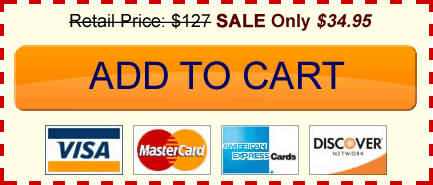
Doesn’t that make you just want to click it? Ryan concluded the following things:

  • The bigger, fatter button was better than the smaller versions.
  • This particular orange color, on the lighter background was optimal for clicks.
  • Placing the text “Add to Cart” instead of “Buy It Now” also increased earnings.
  • Having the credit card logos beneath the button gave customers a sense of assurance and protection, which made more sales go through as well.
  • Also notice the text at the top, with a strikethrough retail price and a sale price next to it.

This kind of stuff amazes me, especially how easy all of it really is. The internet is such an amazing place. There would be no way to do any of this type of marketing research in an offline company, unless we had millions of dollars (like how KFC spends millions on determining which of their sauces to use in their latest chicken sandwich, using focus groups and a lot of time).

Was the “Magic Button” Really a “Magic Button”?

Before trying out this button, I was averaging about 10-12 eBook sales a day on my website at intheleed.com using this button:

I thought I was cool because I had an arrow pointing to it. Let me just tell you, Ryan is much cooler than I am.

I placed the “magic” button on my sales page on November 28th, which was the day I saw that video from Ryan. Yes, I was very eager to test it out. My results?

Since then, I’ve been averaging about 13-17 books a day. I honestly did not change a whole lot of other things on that page besides the look of the button.

I increased my earnings, just by implementing the “magic” button. Absolutely amazing.

How Can This Help You?

If you sell anything online on your website, especially if it’s on a one-page sales page, use the button! It really only takes less than 5 minutes to implement. Of course, you’d have to change the prices to suit your particular product, which can be easily done with photoshop. Heck, if you want me to do it for you, just contact me with the prices you want, and I’ll have a .gif file for you as soon as i can. I want you to succeed!

If you don’t have a product just yet, you should definitely keep this in mind for the future. Also, in my next post I’ll be going over how I’m using Google Optimizer to run my own split-test on my sales page, and how you can easily do this too. You can do things like decrease bounce rates, and increase user action using these same techniques.

I hope you enjoyed this post. All the best to you.

22 Comments (Click Here to Leave a Comment Below)

  • Reply Sarah H. on December 19th, 2008 at 6:29 am

    My husband did something very similar a few months back for his website. He made several different versions of the site that each used a different kind of buy button. I made the buttons and we changed color, size, wording, and position. He ran Google Analytics tests for a few months, but wasn’t able to see a MAJOR difference in conversion rates (although it seemed that people bought a little more with “Add to Cart” than with “Purchase” and the red or green buttons converted better than beige). I think that the differences in the button styles were just too subtle and we likely had too many versions to compare to see anything conclusive. Your two buttons above are VASTLY different and it’s awesome you’ve had such great results already!

    Sarah H.´s last blog post..I’ll Be Homemade for Christmas – Gifts Using Services

  • Reply Will on December 19th, 2008 at 9:46 am

    Wow! That’s quite an increase in sales for something so simple. Good job.

  • Reply Eric Hensley on December 19th, 2008 at 2:14 pm

    Awesome tip Pat, thanks for sharing the love. Now I just need to figure out what to sell!

  • Reply Jim Payne on December 19th, 2008 at 2:44 pm

    Pat: Thanks for the article. I really enjoyed hearing about the split test. I am currently studying for my Six Sigma Blackbelt certification and I may follow you lead on intheLEED. Keep up the good work. Jim

    Jim Payne´s last blog post..Looking for additional savings and income opportunities.

    • Reply Pat on December 20th, 2008 at 1:48 am

      @Jim Payne, that sounds like a great idea! I’ve heard of Six Sigma before, but I’m not sure what it’s about. If you wrote something or had a course, i’d be interested though! Good luck and keep us posted :)

      • Reply Jim Payne on December 23rd, 2008 at 5:28 am

        Pat: Thanks for your encouragement. I have set up blog to begin experimenting with the concept of Six Sigma and other Business Process Improvement related information sharing. I’ll keep you posted as the site develops.

        Jim Payne´s last blog post..My journey…

  • Reply 01Bri-Guy on December 20th, 2008 at 12:24 am

    Hey Pat,

    I just wanted to say I’ve been following your blog for about two months now, but haven posted yet until today. I have really been inspired by your articles and content, and I think you are doing an awesome job. I love the layout of your site too.

    I just started my work on passive income by signing up at ehow and I just got done with my 4th article, and I’m having fun doing it. Eventually I’d like to move into other areas like you have, but I thought I’d pick the most automated one first. I bought WriterGig and Janet Ford’s ebooks, which have been a big help as well, and I make sure to use the link from your site so you’d get some credit too!

    Anyways, I just wanted to says thanks for having an awesome site, and keep up the good work!

    • Reply Pat on December 20th, 2008 at 1:47 am

      @01Bri-Guy, Thanks so much for comment. It’s really fulfilling for me to hear that I’ve been able to inspire others, so thank you again. Congratulations on getting started with ehow, I think it’s awesome, especially since you’re having fun, which makes making money even better. I think you’ve started on the right foot using their books as guides, and it’s something I did right from the start.

      Best of luck to you, and thanks for the affiliate love =)

  • Reply Links zum Montag - MySQL Hacks, Optimierung und Markenverbung - Beim, WordPress, Blog, Google, Artikel, Internet, Twitter, Wissen - 5inline on December 22nd, 2008 at 11:53 am

    [...] sehr Interessanten Artikel habe ich auf dem Blog von Pat Flynn gefunden. Von seinem Kumpel Ryan hat er den Perfekten "Buy [...]

  • Reply evbaw2 on December 31st, 2008 at 8:34 am

    I really enjoy your blog and look forward to it’s updates. I found you on ehow and am learning a lot from you. Thanks for being so honest and sharing everything. I am going to try the BIG sales button. Not sure how to do it yet, but if I can’t figure it out, I might take you up on your offer of doing it for me.

    evbaw2´s last blog post..Add Some Fun to your Homeschool Curriculum

    • Reply Pat on December 31st, 2008 at 10:41 am

      @evbaw2, Hey there! Thanks for visiting my blog. Let me know if you need help creating the graphic sometime. All the best to you, and Happy New Year!

  • Reply Q on September 14th, 2009 at 3:20 pm

    Have you thought about adding a captcha to your comments to reuduce spam. WP has a widget.
    Thanks for your info. your openness speaks volumes. Maybe a post on how to sell your product without looking like your “selling” or alienating readers?

    • Reply Pat on September 14th, 2009 at 3:42 pm

      Wow, I just caught this one. I am usually pretty good at capturing Spam, but I’ll definitely take a look at that plug-in. Thanks! Unusual that he doesn’t have a link to his website in his name though. He needs to read some tips from the blog first!

  • Reply Good Stuff from Darren Rowse - 31 DBBB at Problogger | The Smart Passive Income Blog on September 27th, 2009 at 12:07 am

    [...] In my personal opinion, I think he’s missing two crucial items: testimonials and the “magic button“. [...]

  • Reply How to Run Free Split Tests Using Google Optimizer | The Smart Passive Income Blog on September 27th, 2009 at 12:47 am

    [...] a previous post, I talked about how I spent just 5 minutes to change my “buy it now” button, which this [...]

  • Reply Harsh Agrawal on October 6th, 2009 at 6:19 pm

    There is a golden rule when you sell anything, be different from the normal crowd. Split test is something which brings up the different stuff. I can see the orange color here and since it is always prominent , it obviously attract many new readers…

  • Reply moon h on November 5th, 2009 at 1:45 pm

    Hi Pat,

    Discovered your blog today and it’s been quite an interesting read, esp. since I’ve been interested in passive income for a few months now.

    This post is pretty interesting; can I ask, did you also have two domains setup? If you have two pages for same product, you must have, no…?

  • Reply Jared on February 5th, 2010 at 2:41 pm

    Ok, I think that is totally cool you even offered to do someones button for them. I would never take you up on it, but that fact that you offered is pretty cool. Thanks. You could post a layered .png up here so it was easier for those who know how. Just a thought.

  • Reply Tanji on March 22nd, 2010 at 8:55 pm

    Dear Pat in your ebook this 2 have been written:

    “Please check out my YouTube Channel for a helpful video about changing
    the way your button looks in E-Junkie, as well as other helpful videos to help you
    optimize your eBook sales!”

    “Check out my YouTube Channel where I show you several ways that you can
    create eBook covers and artwork for your eBook!”

    I don’t find any video from where i could learn how to make this Magic Button. Can you please upload a video regarding this?

    • Reply Tanji on April 11th, 2010 at 12:29 pm

      Pat Please reply..please

  • Reply Content Without Design is Dumb | The Smart Passive Income Blog on March 29th, 2010 at 12:07 am

    [...] online button named after himself – The Belcher Button, which I’ve talked about before here on the blog. I’ve watched him, listened to his courses and have implemented a lot of his [...]

  • Reply Simon Townley on April 11th, 2010 at 2:44 am

    I’m convinced. but HOW do I make the button? Is there a download of a photoshop file available, which can be edited?

Leave a Reply

 Subscribe to my Popular Newsletter