
 Pat Flynn
So you’re here because you want to know how to launch a brand new website (with a bang!). That’s exciting, and you should feel proud! This post will show you exactly how to do that and will cover a wide range of website launch tips, including:
- What an ideal launch day website looks like.
- How to maximize your reach and website traffic on day one of your launch.
- Why you need to be able to pitch your website in seven seconds.
- What content to choose to be live on day one of your launch.
- How to create your viral piece: a beastly resource page and a round-up post.
- Why I also recommend having how-to content, case studies, and more.
- How to create a well-designed website people want to stick around for.
- Why you should create a Google Alert for your brand.
- What is a Share Page, and why do you need one, too?
- How to build a pre-launch coming soon teaser website landing page.
- What you can do to build relationships and buzz for launch day.
- And the connections, promotions, and content building you will create after launch.
Before we jump into how to launch your new website, I first need to share some personal context:
I’m often asked about the biggest mistakes that I’ve made while starting and running my online businesses. I typically answer with the following:
- Not starting sooner.
- Thinking about money before serving an audience.
- Trying to do everything on my own.
- Not immediately starting an email list.
- Using a trademark in a domain name.
I learned a lot about how to launch a website through trial and error with my Niche Site Duel project back in 2010. I was challenged by a friend to create a niche website, and within 73 days I was earning $700 per month and was able to propel the site to #1 on Google search results for my target keyword. That site I built eventually became SecurityGuardTrainingHQ.com.
While some of the content in my Niche Site Duel project may be a little dated, I bring it up because it was a revelatory and essential part of my online business journey. I learned so much, failed a lot, stumbled a bunch along the way, and now make my living online.
And so can you.
One of the mistakes I want to talk about today is one I made when starting each of my first online businesses:
Not creating a launch plan for my websites.
While you don’t need a launch plan in order to build a successful website or online business, without one you miss out on the opportunity to make the noise on Day One that could easily put you three to six months ahead of where you would be if you just started publishing content without a plan.
Without a launch plan, you’re publishing content for nobody.
When you first create a website, nobody knows about it but you. Your best content is wasted and eventually over time gets hidden in the archives. There are ways to bring new life back to old blog posts, but when you’re first starting out you want as many people to read those posts as possible. More readers = more sharing, and more authority right off the bat.
There’s no reason you should ever be writing for nobody.
Let’s explore how to avoid that.
An Ideal Launch Day: The Goals
On the day that you launch and share your new website (which is different from the day that you start it), the aim is to have lots of traffic coming your way. “Lots of traffic” is relative, of course (and for any brand new website, any traffic is something to be proud about), but there are ways to maximize your reach and traffic on day one, which we’ll get into in this post.
You’ll also want your new visitors to perform a number of different actions—as many of the following as possible:
- Read your content (duh!).
- Subscribe to your email list.
- Share your content and website with others.
- Engage on your website and leave comments.
- Get excited about what’s coming next.
The main purpose of the launch, beyond getting maximum traffic and engagement on day one, is to truly establish you and your brand as a new authority in the niche that you’re entering—one that’s worth paying close attention to. If you want a little extra challenge to kick off your launch on steady footing, I created Build Your Own Brand, a FREE five-day challenge that’s designed to help you build a brand and website you can be proud of (click the logo below to sign up!).
Entering a niche late is actually an advantage because you can see what’s missing from an existing market, come in to fill those holes, and be the solution that has yet to exist. With a launch plan in place, if done correctly, you can definitely ride the “New & Noteworthy” wave.
Ideally, you’ll want people to think something along the lines of: “Finally! Where has this been all my life?”
What to Do Before You Launch
You’ll want to think of the launch of your new website like an event—something important that happens on a specific day, at a specific time, where your brand and everything it has to offer becomes available to the public.
Doing this puts the launch in the correct frame of mind—not just for you, but for those you’ll be contacting before launch day to help you promote, as well as those who visit your site on launch day. If you are feeling a little overwhelmed (believe me, I get it!), I created what I call the PAT Formula that helps you plan anything—even a website launch.
The specific date also helps you schedule what happens when, and gives you a target date or deadline to shoot for, which will help you avoid procrastination and putting things off “until tomorrow.”
Before you contact anyone, however, there are certain things you should have in place and figured out first:
1. Your Seven-Second Pitch
The first and most important thing to do is find the right way to quickly let people know what your brand is about and why it’s worth paying attention to. This exercise will become the foundation for everything else that happens in and around your launch.
If you can’t pitch your website in seven seconds or less and it doesn’t sound like a no-brainer for those you are pitching to, then you’re not ready to launch.
Therefore, a significant amount of time should be spent on your seven-second pitch and determining the right language to use. It will help you figure out your tagline and the copy to use on your website to get people to stick around and subscribe to your list when they visit, and it’ll also help you figure out how to send the perfect (and quickest to read) emails to people who help you promote.
Why seven seconds?
It’s sort of an arbitrary number, similar to the 30-second elevator pitch, but the fact of the matter is that it’s quick—really quick. It needs to be the MED (Minimum Effective Dosage) of pitches because online you only have a small window to make a first impression before people leave and look for a better solution. Or, in the case of an email, you only have a small window of time before people read it and think, “This isn’t worth my time right now.”
2. Content That Will Be Live on Day One
On launch day, aim to have multiple pieces of highly valuable content already available to consume—not just one single post.
If you don’t have a launch plan, it doesn’t matter. Hardly anyone is there to read that first post anyway. But if you plan a launch, you’re going to set yourself back if all you have is one piece of content to read.
I made a mistake like this when I launched the SPI Podcast in July 2010. I only created one introductory episode before submitting my podcast feed to iTunes, so when people listened to the new show, all they could possibly listen to was that first episode. I actually received a number of low ratings and comments from people saying that the show actually had very little value to offer, which was totally true at that point. All of the good value was to come, so if I were to do it all over again I would wait until I had three or four episodes already in my feed.
The same goes for your website. You’ll have one viral piece of content that you’ll be promoting heavily, but you also want other cornerstones, pillar-type content published on your site, too. Sometimes, it’s not that initial piece of content they read that gets them to buy into you and your brand, but those other posts that may actually be more relevant to them.
Plus, as a whole, your site will already look like a resource to serve that audience that will be worth subscribing too. Again, it should be a no-brainer for your new visitors.
So what kinds of content should you initially publish?
First, let’s talk about that viral piece that’s going to put you on the map and help you promote your site.
Your Viral Piece
All of the content that’s initially on your site is important and should be of the highest quality; however, there should be one incredible stand-out post that you’ll use as your promotional tool from day one, and it should help your site experience some viral qualities right off the bat.
In my eyes, there are two types of viral pieces that you can create. They take some work, but the work can definitely pay off. They are:
1. A Beastly Resource
In SPI Podcast session #67, Neil Patel from QuickSprout.com mentioned that one of the best ways to promote a new website and make noise in a particular market is to create a highly detailed guide—the ultimate one-stop solution for people in that particular market who are trying to learn something. This guide is not a downloadable guide, but rather something formatted within the website itself which will help promote sharing, as well as search engine optimization.
For example, I recently created a helpful resource for how to create and sell an online course. These types of pages are packed with value and really can be a powerful draw to your website if done well.
Not only that, it almost proves authority and expertise right away to new visitors.
This is how Trevor Page from SPI Podcast Session #55 got started so quickly. Within a year, he built and monetized a website with a published ebook and membership site, and it all started with a beastly resource for those getting started with Java programming. It was picked up on LifeHacker.com and things just started to happen right out of the gate for Trevor, which is awesome. Similarly, Lucas Hall from SPI Podcast Session #232, built and sold an “ultimate resource” blog.
A website could contain several of these guides covering many different topics within your niche, but when you start out, pick the one you know is just right for your target audience—the one they are probably already asking for or hinting at elsewhere on the web.
The resource doesn’t have to be a 45,000-word, book-worthy piece of content like what Neil typically creates, but something more substantial than a regular blog post can definitely do the trick. Of course, the length of the piece isn’t what really matters (although that can make an impression), it’s the quality and usefulness of whatever is provided.
2. An Expert Round-Up Post
An expert round-up post was first mentioned here on SPI when Corbett Barr from ThinkTraffic.net was a guest on SPI Podcast Session #08, and it’s exactly what he used to launch ThinkTraffic.net back in 2010 and take it from 0 to 60 in a very short time period. [Editor’s Note: Corbett no longer runs the ThinkTraffic.net site. You can find him at corbettbarr.com.]
Compared to something like a beastly resource, an expert round-up post isn’t quite as instructional or step-by-step, but it can definitely be just as useful and impactful for the launch of your site.
Here’s a round-up post I created that compiles online course creation tips from students of my first year of creating online courses.
An expert round-up post is simply a post that’s made up of answers to a specific question that other experts in your field have answered for you and your audience.
Here’s how to do it:
- Determine the most important question that your target audience wants answered.
- Email other experts in your niche, asking them to answer that one specific question.
- Compile all of the answers into a single blog post, and you’ll begin to see just how much of a resource this post will be for new visitors!
The beauty of this strategy is that not only will you be able to provide this massive resource to your audience, but you’ll have made connections with several influential people in your niche. If you approach these people correctly and follow up with them after your blog post is published, you can easily have several of them sharing the post that they’re featured in with their friends and followers.
If you’d like some help emailing influential people, check out Derek Halpern’s video here.
So which one is better: a beastly resource or a round-up post?
It really depends on your niche, but one is better than none. They both take a lot of different kinds of work to complete, but like I said, you can be put on the map on day one if you do it right.
I’d avoid having both available on day one because they each deserve full attention and promotion.
Other Types of Content to Have Published on Day One
Besides a beastly resource or a round-up post, you’ll want other pillar-style content published on your site as well. An additional three or four pieces can go a very long way.
The most important thing when it comes to all of the content on your site is this: Don’t write about what you want to say, write about exactly what your target audience wants to read. This is always going to be the case, but it’s especially important during the launch of your website.
It’s also a good idea to mix up the types of additional content you have posted on your site. Very much inspired by the content pyramid, different types of posts will appeal to different types of readers. Touch on them all, and you’ll resonate with your audience one way or another.
Forget your personal story—that should be reserved for your about page, and you can touch more on that later. (By the way, I recently created this video to show you how to write an amazing About Page!)
Forget current events and news articles—that stuff isn’t evergreen material. Once you establish some authority, you can definitely tap into what’s happening in the news if you want.
With whatever you write about, make sure to craft that content using three different variations:
- Analytical or Rational Content: This type of content appeals to those in your audience who are left-brainers—people who are all about the numbers and analytics, reasoning and logic. An example of this would be if I were to write a post titled: How Much Does It Cost to Start and Run a Food Truck Business?
- Philosophical or Theoretical Content: This type of content appeals to the right-brainers—people who are all about design and theory, intuition and emotion. An example of this would be if I were to write a post titled: 10 Reasons Why People Buy from the Food Truck Parked Next to Yours.
- Case Studies and How-To Content: Case studies and how-tos are the backbone of the SPI blog, and it’s what people enjoy reading the most. The niche site duel is an example of a case study, as is information about Green Exam Academy and FoodTruckr, for example. How-to content examples include How to Get More Email Subscribers (17 Lead Magnet Ideas) and How to Write a Book: The Secret to a Super-Fast First Draft. The common thread is that this content is made up of examples, experiences, and results) from real-life that people can learn from. An example of this would be if I were to write a post titled: How the Patty Flynn Food Truck Went From $15,000 in Debt to $50,000 in Profit in 6 months.
Putting all of these hypothetical posts together, we get:
- How Much Does It Cost to Start and Run a Food Truck Business?
- 10 Reasons Why People Buy from the Food Truck Parked Next to Yours.
- How the Patty Flynn Food Truck Went From $15,000 in Debt to $50,000 in Profit in 6 months.
That’s a nice set of articles to initially have on a site and would definitely give first-time visitors a great first impression of the types of content to expect in the future.
3. A Well-Designed Website
Before you launch, you’ll want to have a well-designed website in place to house all of the amazing content you’re going to create and publish in the future. It doesn’t have to be fancy or include all of the latest in website design and technology (and really, it shouldn’t), it just has to accomplish a few major things.
All in all, it should leave a great first impression. Your content will help the cause, but before the content is even consumed people are going to make snap judgments about your brand and the website based on the design, and you want that judgment to be favorable.
A clean website that’s easy to navigate and isn’t too overwhelming (e.g., too many options, especially advertisements) is what you should be aiming for.
The branding elements including your logo, tagline, and any other graphical elements on the site should make it easy for new visitors to understand why the site exists and why they should stick around. Remember, people will be approaching your website asking themselves, “Why am I here and what’s in it for me?”
The quality and design of how we present our content can mean the difference between:
- A new visitor staying or bouncing.
- A regular visitor reader getting excited or bored.
- A potential customer buying from you, or buying from your competitor.
- An existing customer being satisfied, or asking for their money back.
- You can have the best content in the world, but without good design, you might not make that lasting first impression.
First Impressions
Design and presentation are vital for first impressions. Online, first impressions mean a lot more than you think.
The average person spends about 7 seconds on a single website, which means you have about 7 seconds to make a good first impression on your new visitors, or else they’re going to leave.
This means having a strong visual impact right from the moment the page loads, especially when it comes to what your website is about and exactly what it can do for your visitors. Can you tell exactly what your site is about just from looking at the homepage?
This means including something that makes you stand out from the other 200+ websites they visited that day. Why do things the same, when there is an unlimited number of things you can do to be different? Think of what makes your brand, and you (because you are your brand) unique. Implement that within your website design. Make it your own!
And you want your website to be effective at converting traffic into leads and subscribers, as Sarah Peterson, head of content marketing at Sumo.com, reminds us.
And lastly, you’ll want to make it incredibly easy for visitors to do the following:
- Read your content.
- Subscribe to your email list.
- Share your content.
- Leave comments.
An entire blog post could be dedicated to just the design of a website for launch date. For now, these are the main elements to keep in mind:
4. Set Up a Google Alert for Your New Brand
Go to Google Alerts and set up an alert for keywords that match your brand name, your URL, and even your own name. The idea here is to have Google monitor activity on the web and send you emails the moment another site mentions your brand on their website so you can go there and thank them, but also capitalize on any PR that might be happening after you officially launch.
This is just preparation work for what happens after you launch.
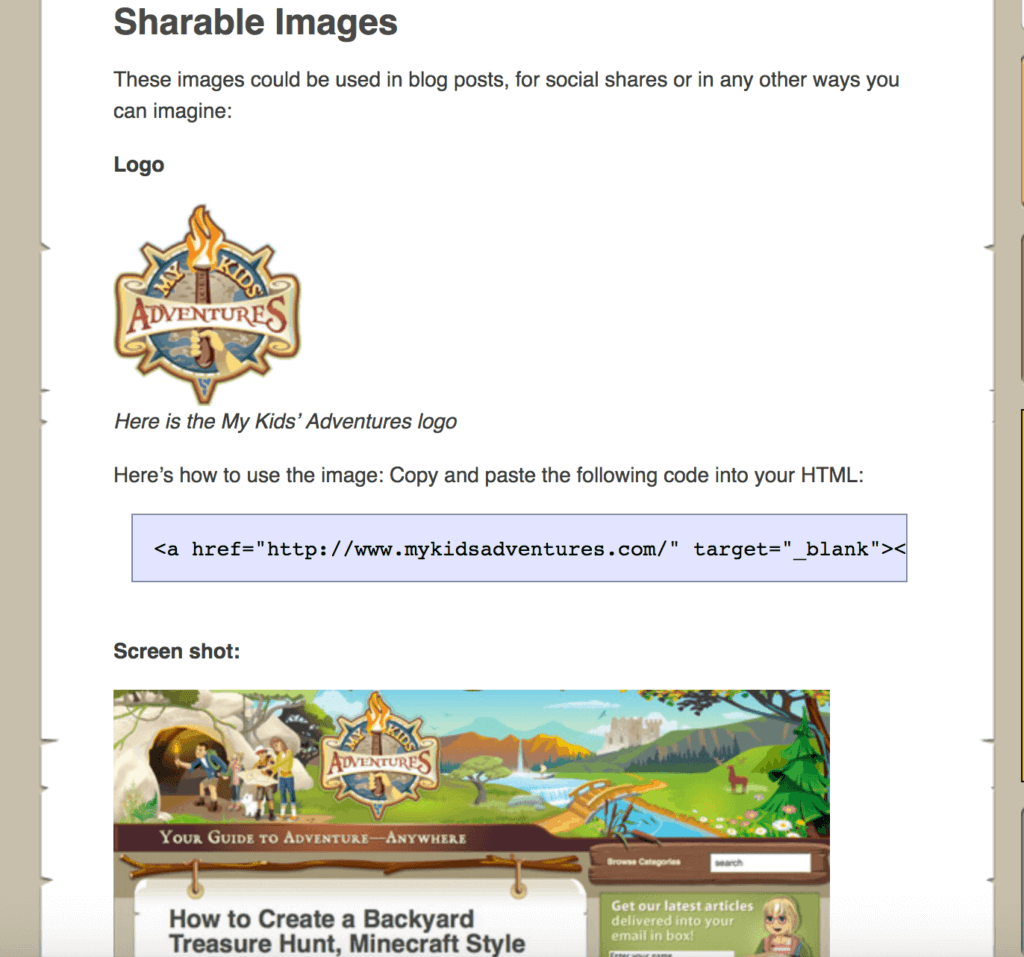
5. Create a Share Page
After you launch, you want people to share your website in any way possible. So, you should create a page that makes it incredibly easy to share your website in any way that people desire.
Your share page should include:
- Embeddable videos
- Social images and website logos
- Screenshots of website pages
- Social messages
- Sidebar images with calls-to-action
- Interesting facts about the website launch
A great example of this comes from the website MyKidsAdventures.com. Click here to check out their share page. [Editor’s note: This site is no longer active.] And here’s a little taste of what that looks like:
6. Create a Pre-Launch “Coming Soon” Teaser Page
Before you officially launch your website, you can already begin the marketing process for your site by creating and promoting a pre-launch “coming soon” teaser page. People love to know in advance of the next big thing, so if you can convince people that what you’re creating is worth paying attention to and you create an environment of anticipation, creating this page will be well worth the effort.
Once you launch, you can send an email to your list and immediately have traffic coming to your website, not to mention a list that’s already greater than zero.
Furthermore, if you begin to notice a number of people getting interested in your website before you launch, that’s a huge motivator for you to keep going and get things done.
On this teaser page, you’ll want to make sure you:
- Let your visitors know what you’re doing.
- Spark some interest.
- Capitalize on that interest by capturing email addresses.
Think of these early subscribers as ambassadors. They will be the first to know when your new site is up and can be there to help you spread the word right from the start. If possible, give something away to them as a thank you for subscribing that will only be available before the launch.
So technically, how do you create this page on your site?
The tool I have experience with is LeadPages, an incredible landing page resource that makes it super easy to create a sleek, WordPress compatible, mobile-friendly and responsive landing page in just minutes. [Full Disclosure: I’m a compensated advisor and an affiliate for LeadPages.]
LaunchRock is another that I’ve heard people use and have enjoyed, but I don’t have any experience with it myself.
Build Relationships and Buzz for Launch Day
Before you read through this section, first check out my YouTube video, FAIL-PROOF Launch? 5 Strategies to Launch Your Product or Business. In the video, I walk you through 5 unique strategies that will help set yourself up for success on launch day, including crowdsourcing a launch, running a contest, using “passive strategies,” and more. Check it out:
All of the previous sections of this blog post talked about stuff you create yourself, but unfortunately, we don’t live in a world where “if you build it, they will come.” Although it can happen sometimes, it’s never guaranteed and it never happens without the work and influence of other people involved.
You must get other people involved to help you maximize the effectiveness of your launch.
If you want to launch with a bang, it’s important to start building relationships before you launch your website (or launch your book, like I did by creating a “street team” for Will It Fly?). Nothing else will help get your site off the ground more than other people talking about it, and if you have a relationship with other influencers and people with a similar target audience, you will have people on launch day who will genuinely want to help you, which is awesome.
To build the relationships, or that “street team,” you’ll need to build that buzz, here are a few essential tips:
- First, invite people to be a part of your street team or launch team. Create a simple sign-up form using Typeform, Survey Monkey, or Google Forms, and send that out to your audience via email and social media to ask them to sign up and be a part of your launch. You can also text your friends and ask.
- When you’re filling out your form, make sure to capture the following information: name, email address, social media channels. Also ask why they want to be a part of the launch team, what they could contribute, and ask them to share something unique about themselves.
- Make it fun. While your community may want to help you because you’ve built that authority and trust, it’s also important to make it fun for them. Engage with them, and make sure to treat them. If you’re launching a book, you can give them an advance reader copy of the book. For a website launch, create a Facebook group, ask them to be a part of your building process, ask for feedback on content, make sure they know that they are truly part of the process.
- Organize your launch team two months before your launch date. This will give you plenty of time to build up your team, foster engagement and excitement for the launch, and give you time to make adjustments and hone the product/website/book before your launch date.
Remember, always, that your launch team is a community comprised of individuals. Treat them well, engage with them, ask them questions, make sure they know how grateful you are for their support. Lean on them, and trust them.
@PatFlynn Connect with your industry and build community before launch. You’ll have people eagerly waiting to visit and share your site.
— Casandra Campbell (@ccampb85) July 15, 2013
The 200-Outreach Program Spreadsheet
First, it’s important to understand who you should be building relationships with. Taking advice from Neil Patel in SPI Podcast Session #67, you (or your virtual assistant) could organize a spreadsheet and follow the 200-outreach program.
Here’s how it works:
On that spreadsheet, list the top 200 websites that are highly relevant to your topic who may be interested in what your site is about. Next to that column, add a space for either a contact form URL or an email address so you can easily contact the owners of these websites.
In another column, start listing the top 200 blogs.
In additional columns, list the top 200 Facebook Fan Pages, Twitter Accounts, Instagram profiles, and LinkedIn profiles.
I would also add as many relevant podcasts to that spreadsheet as possible.
This spreadsheet will become your go-to resource for who to reach out to and start building relationships with, and yes—you can start building these relationships before you officially launch your website.
It’s really important to understand, however, that when you reach out, it’s not about you. It’s about who you’re reaching out to and what’s in it for them.
@PatFlynn Email people you don’t know, that have an audience you want to reach, with something they feel compelled to share.
— Derek Halpern (@derekhalpern) July 15, 2013
The Round-Up Post Resource
If you’re doing a massive round-up post as the featured post during your launch, your spreadsheet is exactly where you’ll want to start. As Neil recommends, I would customize each email slightly so they don’t read too “cut-and-paste.” Go to the websites you’re reaching out to before you send an email to the owner and mention something they’ve been writing about recently on their site in the email.
To take it a step further, even before you email people, retweet their stuff, thank them on Twitter and Facebook, and have legitimate conversations with them so they at least notice you’re there. Now is not the time to pitch your new website—that will come in a later email. Plus, if there’s a relationship at all, less pitching will be needed. Then, when you eventually email those people, it’ll feel less like it’s out of the blue because you’ve at least attempted to make contact with them before via social media.
What this does is introduce you to these influencers in your niche, and if your teaser page is compelling, these influencers will not be able to ignore a new potential player in this niche who is obviously trying to work with them, not against them.
If you’re doing a beastly resource instead, you can still reach out to these top influencers beforehand and even include them in your resource and mention that to them. Don’t be afraid to share that resource and mention your launch plan, too. A few of them might show major interest in what you’re doing and help you out in more ways than you can imagine.
Guest Posts
The old tried-and-true method of guest posting can definitely work before you launch your main site to help build buzz for your brand, kindle relationships with website owners, and build your email list at the same time.
Linking to your homepage before the launch in a guest post you publish on another site will drive traffic to the teaser page, which is exactly what you want. After launch, the teaser page will no longer exist and traffic will see your main site instead.
If you have a list of at least fifty potential posts to publish on your site over time, it’s definitely worth investing some of those articles into other websites to make a big splash on launch day.
Build An Off-Site Audience
Just because your site isn’t live doesn’t mean you can’t start building a community of fans and followers. You can create a Facebook Page and start to build a community there (and paid traffic is definitely a great option if you have the money to spend), but you could also go to where hordes of your target audience already exist.
Beyond other people’s websites, which you can get in front of via guest posts, you can actually have a lot of influence on forums, too. Provide value, answer people’s questions and don’t pitch, and if you include a link to your teaser/homepage in your by-line, chances are you’ll start to build a little bit of authority there which can easily transfer to your site on launch day.
Ask Your Existing Network
I remember a friend who launched a new iPhone app last year, and I did get an email from him about it, but it was on the day it went live!
He spent three months building the app, which was three months he could have used to build buzz and get people ready for its launch. I would have totally been down to not only help him develop a launch plan but simply be ready to mention the app to those who I thought it would be useful to on the day it went live. Because I didn’t know about it I couldn’t just randomly post about it and even if I did, it wouldn’t be as effective as if I knew about it beforehand.
Don’t be afraid to ask your existing network for help—like friends or family. If it’s something you truly believe in, even if it doesn’t 100 percent apply to those people, it’s something they will be proud to share for you.
@PatFlynn Personally email close friends and/or peers asking them for support. It’s amazing how helpful people want to be! Ask kindly!
— Vicky Lyashenko (@VickyLyashenko) July 15, 2013
And Remember. . .
The launch of your website should be treated like an event, so build anticipation for it and keep people who have given you words of support up-to-date on your plans. Then, when the date comes around and you turn off that teaser page, celebrate what you’ve just accomplished, but realize that you still have a lot of work to do.
After You Launch
The moment you flick off that teaser page there are a number of things you should do:
- Email the list you’ve built. You already have an email list—awesome! Now it’s time to email your subscribers and let them know you’re live. Also, give them an easy way to share your new site by including a link to that convenient share page on your website. These are your ambassadors, and you’re definitely allowed to ask them to share for you.
- Source your 200-outreach program. Beyond tapping into your existing list, send a quick, personalized email out to each website and blog on your 200-outreach program spreadsheet. You could even draft each of these emails beforehand so you aren’t spending time on launch day writing them. A quick mention that you’re live and a link to your ultimate resource can go a long way, and even if you get a two to five percent response rate, that’s more than you’d get if you didn’t send any emails at all. Don’t force anything or be aggressive in your emails, and remember what’s in it for them too.
- Thank those who have helped you. If anyone has helped you get to this point, email them to thank them. It can go a very long way. If you’re thanking those in a round-up post, include a quick, easy-to-copy-and-paste link that they can share on their social media platforms. If you find people are retweeting your stuff or mentioning your new website on Twitter, reach out and thank them too.
- Reply to every comment. On launch day, if you do it right and you have traffic coming to your website, chances are you’ll get a number of comments on each of the posts that you’ve already written. Respond to each one of them. You want to be as present on day one as possible because if new visitors see you’re actually replying to comments and active on the site, they’ll be more likely to stick around and share. You won’t always be able to reply to every comment down the road, but it’s one of the most important things to do within the first few months of a website’s start.
- Reach out to local news. Local news stations are always looking for new stories, content, and events to share. There’s no harm in reaching out to all of the local news networks and pitching them your new website and seeing if they’d be willing to cover the story. What’s the worst that could happen? They’ll say no. . . and that’s not a big deal.
- Keep producing more content. If things are going well, you’ll want to ride that “New & Noteworthy” wave as long as possible, and the best way to do that is to continue to provide more content frequently right from the start. Check out my blogging tips for a bunch of strategies for keeping your content train on the tracks.
Beyond those things, keep asking people (and providing easy ways) to share and subscribe to your list. Within the first week or two, you’ll be several months ahead of where you would be if you just started dripping content to an audience of zero. Keep your eyes and ears open around the web about you and your brand, and over time make pivots to better serve your audience in the way that they want to be served.
I hope you enjoyed this post. It came out much longer than I anticipated but I couldn’t shave off any of it because I want you to learn from my mistakes and have the best chance to make the most noise right from the start.
If you enjoyed this post and feel it’s worth sharing, please click here.
And before I go, if you want to level up your presence online, we have comprehensive guides to getting started with email marketing, podcasting, affiliate marketing, and more!
- Email Marketing Best Practices and How-To Guide
- How to Start a Podcast Step-by-Step Complete Tutorial
- Affiliate Marketing – The Ultimate Step-by-Step Guide
- Online Courses – The SPI Essential Guide
- Making of a Membership Community Workshop
Cheers, and I wish you all the best!

 Brian Dean