
What Is Email Marketing? + Best Practices: An SPI How-to Guide
Welcome to my epic email marketing guide!
If you’re looking for in-depth guidance on what email marketing is, why it’s important, and how to go about it in the smartest way possible, then you’re in the right place.
I’ve made plenty of email marketing mistakes in my decade-plus as an online business owner. I’ve also done a lot of things right. And of course, I’ve learned a ton in the process.
This epic guide is my way of sharing that knowledge and experience directly with you, for free. Why? Because I know how important email marketing is to any business. And I want you to get email marketing right, for your sake and the sake of the people your business is trying to serve.
I want to pay forward what I’ve learned. So put on your email marketing cap (mine’s a beanie with a propeller on it) because we have an exciting ride ahead!
But before we get into all of it, we have to answer a simple question. . .
Contents
- What Is Email Marketing?
- Is Email Marketing for Everyone?
- How Email Marketing Works
- How to Do Email Marketing
- Email Marketing Best Practices
- Case Study Examples of Email Marketing
- Mini Email Marketing Case Studies for Quick Inspiration
- The 25 Most Common Email Marketing Mistakes
What Is Email Marketing?
What is email marketing? In the simplest definition, it’s using email to promote or market your products and services to your audience. But like any form of marketing, the “promote or market” aspect often takes precedence over a less apparent but arguably much more important one.
That less visible but more important element of email marketing?
Relationships. Getting to know your audience, understanding their pain points, providing value, being of service. Knowing that every person on the other end of that email is a human with interests, fears, needs, and desires.
In this way, successful email marketing is like successful marketing via any other channel. And there are definitely many forms and channels for marketing out there: social media, your website, ads, billboards (if that’s your style). So why would you want to focus on email marketing?
To put it plainly, email marketing is one of the best ways (and maybe the best way) to foster a relationship with your audience and promote your products and services to them. Email lets you connect one-on-one with your audience, helping you strengthen your relationship with them, and yes, make them feel more comfortable when you eventually pitch something.
Email also has two key advantages as a marketing channel: it’s easy, and it’s cheap. Unless you’ve been living on a remote island for the past twenty years, you probably know how to send an email. And the cost of sending that email, whether it’s to one person or 1,000, can be as little as, well, zero (except for maybe a tiny percentage of what you pay the power company and internet service provider every month).
Now, email marketing can get more expensive if you sign up with an email service provider, and we’ll talk about that soon—but on the whole, it’s still one of the least expensive forms of communication out there.
Your email list is also a valuable insurance policy. Social media platforms can change their rules on a whim (or even disappear altogether), websites can crash or be hacked . . . but an email list will be your mainstay. It’s something no one can really take away from you. As long as you have a backup copy of your current email subscribers and some way to send and receive emails, well, you’re still in business.
I learned this the hard way myself in 2013, when my own website went down because of a denial of service (DDoS) attack whose effects lasted over a week. My email list became my refuge to stay in touch with my audience and keep them updated on what was happening.
That’s why this is no understatement: My email list has become the number one asset in my brand. And so I’m on a mission to help others build their lists the smart way too.
And when it comes to sheer money-making potential, email is no slouch. In fact, I’ve seen businesses with fewer than 200 email subscribers have five-figure product launches! How? Because each of those business owners focuses on growing an email list with the right kind of people, and then serving that audience with the right kind of products. Whether you’re an affiliate marketer, you create your own products, or you’re not even sure what you’re going to sell yet, an email list is the ideal way to connect with your audience.
Want more evidence of the power of email marketing? A single broadcast email once helped me bring in over $60,000 in affiliate earnings. And more than $1,000,000 in total earnings can be directly attributed to my email list. But just as important, email has helped me discover the top pains and problems of my audience, which can then be used to craft content and product ideas to help alleviate those pains and problems.
Email is simply one of the best ways to provide value and build a trusting relationship with your audience. And yes, make a living.
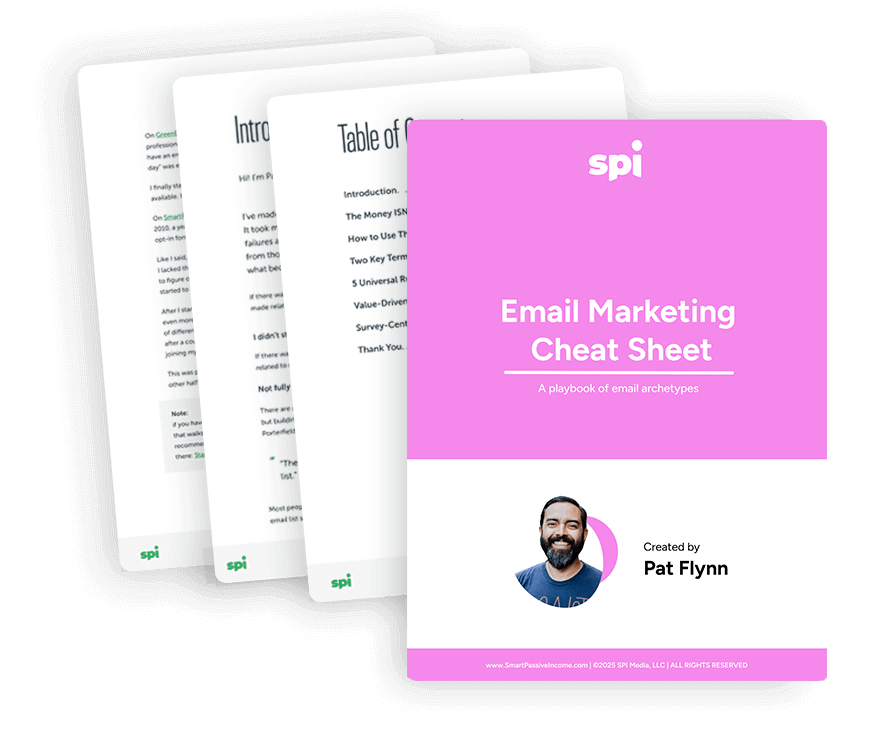
Download the FREE Email Marketing Cheat Sheet
You have your email list set up, but what should your emails say? The Email Marketing Cheat Sheet teaches you exactly what to send to your list, including 10 cut-and-paste-templates for the different types of emails your audience will look forward to.
Is Email Marketing for Everyone?
So email marketing is a great way to build your audience and make money promoting relevant products and services. But is this form of marketing for everyone? In a word, yes.
You might be wondering, “What if I want use email to market to millennials? I’ve heard they’re all just on Instagram and Snapchat. Do they even have email addresses?” In fact, studies have shown that email is still incredibly important to millennials. So you can scratch that worry off your list!
Are there any scenarios where email marketing doesn’t make sense? Maybe your audience has told you they don’t use or like email (perhaps if you surveyed them and very few of them like getting emails). Or maybe you’re having a ton of success connecting with your audience and marketing your products or services to them via other channels like Facebook or Instagram, and you don’t have the time or energy to try out a new marketing channel.
Or maybe email’s just not your thing. And that’s fine. I totally get it. All I ask is that you keep an open mind, because I truly believe that when done the right way, email marketing can work amazingly well for anyone trying to build a business and grow their audience.
As I see it, the important question is not really, Is email marketing for me? and more like, How can I best use email marketing given the nuances and needs of my industry/niche/audience?
At the end of the day, email marketing lets you speak to your audience in a format that’s accessible and familiar to just about anyone. And while the barrier to entry with email marketing is low, the possibilities are sky high. How to tap this promise and take your business to the next level with email marketing is precisely what we’ll be exploring throughout this guide.
Despite the Hype of Social Media, Email Marketing Is as Important as Ever
Email has been around since the 1960s, and it’s been in popular use for decades now. In terms of online marketing platforms, email is old news. In the age of Facebook, Twitter, Instagram, email is practically a dinosaur. Right?
Wrong.
Here’s David Heinemeier Hansson (DHH), one of the founders of Basecamp, who puts it perfectly in a tweet he shared in early 2019.
In 2013, hackers took down my website for over a week. I lost an estimated $12,000 in potential revenue. I also lost a ton of time (and brain cells from the stress). It was a pretty awful experience.
There’s something else I could have easily lost as a result of the website attack, and that’s my audience. In fact, I could have lost not only my audience, but my entire business after the attack.
But I didn’t lose either of these things, thanks to one very important thing: my email list.
As DHH says, “Email is the next big thing.”
Of course, there’s a little bit of humor in that statement. Because email never went anywhere! But the reason he says this is that compared to other marketing platforms and channels out there, email offers something different, something stable, something time-tested.
What am I talking about?
Well, as you might have experienced yourself, there’s a lot of things getting in the way of us reaching the audience we’re trying to build on platforms like Facebook, Twitter, Instagram, and YouTube.
Why? Because on these platforms, you don’t own your audience. You have almost no control over whether your message gets to the people you want to see it.
Facebook can control how often people see your posts. YouTube can control how often they see your videos. Your access to your audience is at the mercy of algorithms and your willingness to open your wallet for ads and sponsored posts. Instagram could go down tomorrow, and where would you be?
But with email, you fully own your list. You basically have a direct line to each person on that list. And if you’ve set a precedent of providing value to those people, they’re going to want to open your emails every time.
Getting Email Marketing Right Is a Must
So email is back (even though it never went away), and it’s still perhaps the best way to stay in touch with your audience.
And that’s why if you haven’t been focusing on email so far in your online business journey, now is the time to make a change. Email is how you will take control of your audience and serve them better. It’s how you’ll develop an insurance policy for your business. Whatever happens with social media platforms and other technologies won’t matter because—as I learned when my own website went down—you’ll still have access to your audience if you have them on your email list.
You’ll have a lifeline.
So getting email marketing right is a must. But it’s not enough to just have a list and send occasional emails to it. Successful email marketing requires you to understand all the ins and outs of this marketing platform.
How Email Marketing Works
If you’re alive in the twenty-first century (and you are if you’re reading this!), then you’ve almost definitely been the recipient of at least one piece of email marketing.
Some of those emails have most likely been good, and some . . . not so good.
When used properly, email is one of the finest ways to cultivate positive relationship with an audience. When used less than ideally, well, it becomes pretty obvious when someone is only emailing you to sell you something. The word “slimy” comes to mind.
I’ve made it a big part of my mission to help people unlock the power of email marketing, and do it in a non-slimy way. In order to get you on the path to successful email marketing done smartly and ethically, it’s important to give you a clear understanding of exactly what email marketing is, why it’s important, and how it works.
Examples of Email Marketing
Email marketing comes in many forms. But there are two basic types of email marketing you’re likely to see out in the wild:
- Autoresponder email marketing campaigns
- Broadcast emails
Let’s talk about both of them briefly.
Autoresponder Email Marketing Campaigns
Maybe this scenario sounds familiar. You sign up for the email list of an entrepreneur you want to hear from more often. Right after you sign up, you receive an email welcoming you to the list, and perhaps a link to a free resource as a thanks for joining the list (also known as a lead magnet). Then, a couple days later, you receive another email asking you what you thought about the lead magnet.
“Wow,” you think. “This person is really on top of this email thing! They know exactly when I signed up, and exactly when to follow up with me!”
That’s all true, except for one not-so-minor detail that exists behind the scenes. The marketer isn’t manually drafting and sending those emails in real time. Instead, all the magic is happening because of an automated email sequence the marketer has created: an autoresponder email marketing campaign (or series). An autoresponder series is a fancy term for a number of automated pre-written emails that get sent to your subscribers in a sequential order.
An autoresponder campaign makes it easy to take people through a series of emails (which begin on the first day a new person subscribes) without ever having to do any work, since you’ve already written the emails. They’re great for guiding people through an email course, reintroducing old content to new subscribers, promoting affiliate products, and much more.
Broadcast Emails
Of course, not all marketing emails are pre-written and automated in this way. Sometimes, These emails are called broadcast emails. They’re also known as bulk or mass emails. Marketers usually send a broadcast email when they have news or a one-time announcement to share.
Broadcast emails are a great way to share news and new content, ask questions, promote your products and services, and notify your audience of issues. They can be scheduled in advance, like a regular weekly email newsletter—or sent more spontaneously, like an email announcing a flash sale on a product or service.
With Email Marketing, Focus on Quality over Quantity
A huge lesson I’ve learned about email marketing is this: it’s not the size of your email list that matters. It’s the quality of that email list.
Focus on quality over quantity. A strong business solves problems—focus on finding the people who have the problems that your business solves.
I’ve seen businesses with less than 200 emails have five-figure product launches! How? Because those business owners focuses on growing an email list with the right kind of people and serving them with the right kind of product. Email marketing is an incredibly effective form of marketing, no matter what type of business you have. Whether you’re into affiliate marketing, creating your own products, or even if you aren’t sure what you’re going to sell yet, email marketing lets you start connecting with your audience now.
Every Email Needs One Goal & One Call to Action
Stepping back a little, no matter what type of marketing email you’re sending, you need to keep in mind one basic concept to ensure the email has the intended effect. Whether it’s a broadcast email or one part of a broader email campaign, when you’re crafting any email, you should always ask yourself: “What’s the purpose of sending this email?” Framed another way, “What action do I want the reader to take after reading it?”
Each email you send should have one specific goal, and it should also have a single call to action—a request or suggestion for the action you want your reader to take. Later in this guide we’ll talk a lot more about how to write great emails with clear calls to action, but for now, know that by having a specific goal and call to action for each email you send, you’ll be on the right track.
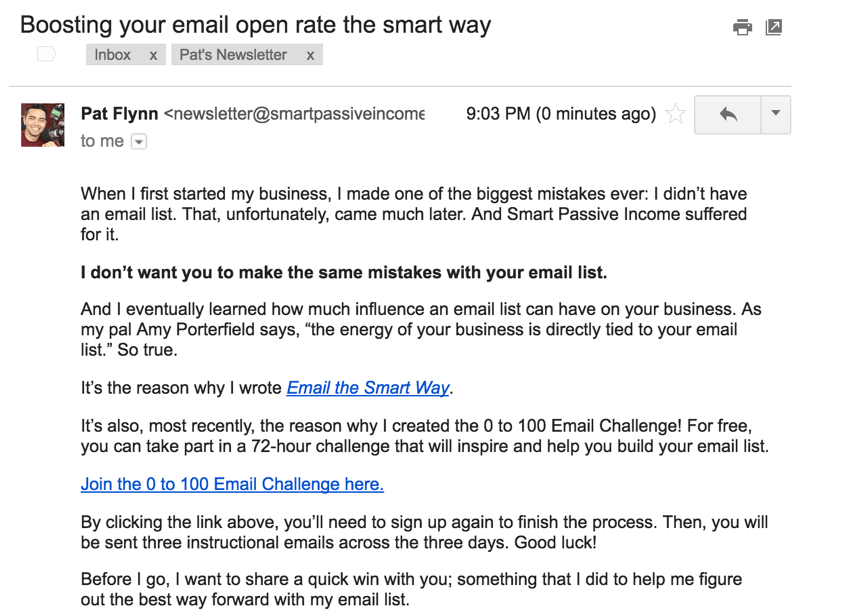
My goal with this email was to help people grow their email list and improve the performance of their marketing emails by joining my three-day 0 to 100 Email Challenge. The call to action was to click on a link to a landing page where they could learn more about the challenge and sign up for it.
You’ll also see that in this email I didn’t just jump right into talking about the email challenge.
I began with a personal anecdote about a mistake I’d made earlier in my business life when it came to my email list (not starting one at all). Then I shared how I wanted to use what I learned from that mistake to help others avoid a similar dilemma.
Finally, I made sure to only include a single call to action. Although you can see two links in the email, they both go to the same page on my website.
So in this email, I’m telling a personal story to connect with my reader and express interest in sharing what I’ve learned to help them avoid a business problem I’ve encountered. Then I’m making it easy for them to take the intended action by only providing links to the page where they can take that action.
Be relevant, be of service, and be clear. Show that you care, offer value, and make it easy for your reader to take the intended action.
Now, the email above is definitely not the only way to put together a marketing email, and we’ll see lots more examples of great marketing emails and email marketing campaigns in the rest of this guide. Before we move on, though, I want to talk a little about the technology behind a successful email marketing system—and why going it alone might not be the best option for you.
Email Service Providers & Why You Need Them
We haven’t spent too much time yet on the mechanics or logistics of getting started with email marketing—we’ll tackle that soon! That’s because it’s important to lay the groundwork of a successful email marketing system by getting clear on what really matters: cultivating a healthy relationship with your audience.
Thankfully, email is a really accessible tool to do that. Pretty much anyone with a computer and an email address can send and receive emails. From there, it’s just a short step to creating a basic email list to stay in touch with the people who want to hear from you.
How would an email list work in the most basic form? It could be as simple as collecting email addresses manually, creating a group of contacts in your email software, and manually sending emails to those contacts.
This could be fine if you plan to keep a small list that you only want to email occasionally and never want to segment (i.e., send emails to different groups of the list at certain times). But this is where things start to get interesting. If you ever decide you want to use your list in a more sophisticated way, you’ll quickly find yourself in over your head!
Yes, you might be able to implement some more advanced email marketing strategies without the help of outside software or services beyond your basic email client—but it would be pretty tricky, and you’d be limiting your potential and wasting your time.
And email marketing is already tricky enough on its own without the added burden of doing things manually. Just making sure what you’re doing is legal can be a lot of work. Specifically, all email marketers need to abide by a piece of law call the CAN-SPAM act, which helps ensure that marketers are not abusing their access to people’s email addresses. And more recently, marketers also need to follow the rules set by the General Data Protection Regulation (GDPR), a set of laws that puts in place privacy protections for citizens of the European Union (EU). The GDPR has some pretty complicated requirements that may not be easy to comply with if you’re doing your email marketing manually.
We’ll talk a lot more about both of these laws in a later on in this email marketing guide, but for now suffice it to say that they strengthen the case for not trying to do your email marketing “the old-fashioned way.”
Thankfully, we live in the golden age of software as a service (SaaS) companies. Some of those companies exist specifically to serve entrepreneurs, marketers, and artists who want to better serve and connect with their audiences via email. These companies are called email service providers (ESPs), and they provide platforms that allow you to send and receive emails—and a whole lot more, including automating emails and creating sequences, managing lists within your email list (called segments), and even integrating with other services you use to run your business.
I’ve used a few different ESPs for my own business throughout the years, including Aweber and InfusionSoft. But the one I currently use and recommend is Kit (formerly named ConvertKit). Kit makes managing your email list and setting up autoresponders super easy and user-friendly. It’s also awesome for segmenting email subscribers into groups so that they receive content specific to their individual needs—something we’ll talk about a bit later on. [Full Disclaimer: I am a compensated advisor and affiliate for Kit.]
For a look behind the scenes of how I use Kit to manage my own email list, check out this demo video:
If you’re raring to go, click here to get started with Kit and get your first month free. [Full Disclosure: As an affiliate, SPI Media receives compensation, at no additional cost to you, if you purchase through this link.]
And if you’re just starting out with your email list and don’t think you’re ready to commit to an ESP, that’s okay! Stick with us in this epic email marketing guide, because later on we’ll walk you through how to get started with email marketing.
Before You Begin, Remember It’s About People
There’s one more thing I wanted to touch on before we close things out here—this is the “last but definitely not least” section of things. Like everything I teach when it comes to online business, I believe successful marketing—email marketing included—is based on these three principles:
- Your audience is made up of people, not dollar signs.
- Your primary goal is to serve your audience, not sell to them.
- When your audience succeeds, they will look for ways to pay you back.
Some people say “the money is in the list”—but this isn’t quite true. The money is in how you use the list. It’s not just having an email list; it’s what you do with it. And what you do with the list has to be about more than just making money. If you’re not using email to serve your audience and respond to their needs and desires, then the money-making potential of your email list is going to be seriously diminished. But if you put your audience first, the sky’s the limit with email marketing.
Yes, you can use email marketing to take your business to new heights if you go about things the right way. If you’re ready to get started, let’s talk about exactly what you need to do to hit the ground running with your very own email marketing plan.
How to Do Email Marketing
Ready to dip your toes into email marketing? Great! Let’s start by focusing on the fundamental best practices for successful email marketing, plus targeted ways to build your list with lots of subscribers who are excited to hear from you.
The very first thing I recommend you do is set up an account with an email service provider (ESP). While it’s perfectly possible to do email marketing without using an ESP, I don’t suggest it. Why? Because the benefits of doing it on your own are minimal, while the drawbacks are significant.
The main benefit of doing it yourself is you’ll save on the cost of subscribing to an ESP. You could also make a case that by doing everything “in house” you’re safe from whatever happens to a particular ESP—maybe their servers go down, or the whole company goes out of business. But unless you’re planning on hand-delivering letterpress notes to all of your subscribers, you’re going to be relying on internet companies and technologies to deliver your emails, even if you’re not using an ESP.
And what you’ll be missing without an ESP is pretty substantial. I’m talking about the ability to automate a ton of different things, like adding and removing subscribers from your list, or personalizing emails. I’m talking about easily segmenting your list and tagging people according to their interests and actions, so you can send them the most relevant email content. I’m also talking about tools that help you stay in line with the sometimes complex requirements of laws like CAN-SPAM and GDPR.
Those are just a few of the major benefits of using an ESP. There are several good options out there, but the one I use and recommend is Kit. It’s affordable and super easy to use, and includes a lot of the advanced features that will come in handy as you grow. [Full Disclaimer: I am a compensated advisor and affiliate for Kit.]
With that out of the way, let’s talk about what you need to know about how to do email marketing as you’re getting started.
The Foundational Rules of Email Marketing Success
Ready for a crash course in email marketing best practices? Here are the three main rules you need to follow if you want to succeed.
1. Quality Over Quantity
Rule number 1 is to focus on quality, not quantity. That’s true when it comes to both the makeup of your email list itself and the content of your emails.
First, it’s not the size of your email list that matters, it’s the quality of it. A strong business solves problems—so focus on finding the people who have the problems that your business solves.
I’ve seen businesses with fewer than 200 email subscribers have five-figure product launches! How? Because those business owners focused on growing an email list with the right kind of people, and then served them with the right kind of product. I would much rather have a smaller list of dedicated fans than a much larger one filled with lots of folks who could care less about reading my emails.
Now, I’m not a fan of looking at each of your email subscribers as just a number or judging them solely on the question, “How likely are they to buy?” But you need to have this mindset to some degree, not just because it’s good for your business, but because it’s good for your subscribers. The more tailored the content to their needs and interests, the better you’re going to be able to serve them.
Now to the emails themselves. There’s no “rule” for how long a typical email should be. But there is a rule for how much value it should provide (hint: a lot).
To give you a sense, I’ve written and sent thousands and thousands of emails to people on my list in the past decade. And those emails have ranged anywhere between 250 and 2,000+ words. There are times and topics where it makes sense to be brief—perhaps you have a flash sale on one of your products and you want your readers to take quick action. But other times, you may want to share some deep insights about a business problem you recently encountered, and you need to get into four-digit-word territory to do the story justice.
My emails range in size from really short, like this one (just 168 words!), to into the thousands of words.
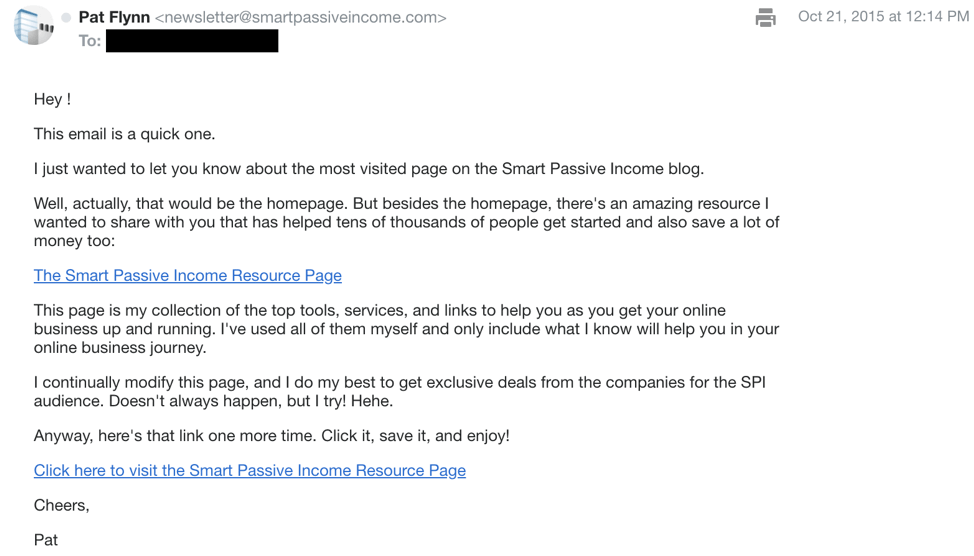
Sometimes quantity = quality. Yes, some of my emails really are 2,000 words long (or more). You might be thinking, “Wow! That’s too much! People are going to be bored.” If they’re bored, it’s because I’m not writing about something they’re interested in. Sometimes people tell me, “Oh man, I wish you’d written more, because this is good stuff.”
The key to remember is that when you send someone an email, you’re asking them to grant you their undivided attention for as long as it’ll take them to read your message. People are very strict with what they do with their time, so if they give you the honor of opening your email, you need to return the honor by making the content great. Sometimes that means fewer words, and sometimes it means more.
Don’t get hung up on the word count—just make every word count.
2. Send Value-Driven Emails
Value-driven emails are ones that include content that is of real value to your audience.
By sending value-driven emails, you will be strengthening the relationship you have with your subscribers and positioning yourself as an expert in your niche. And, because your audience won’t want to miss out on the valuable content they’ve come to expect, you will also train them to form the habit of opening all of the emails you send.
Once someone has subscribed to my list, I like to give them a small win—something really valuable they can implement quickly. You only get one chance to make a first impression. So as soon as someone subscribes to your list, share your best, most actionable tip—something people can get a result from within five minutes of implementation.
This also helps set a precedent for your readers, so that they’ll expect value from all of your emails moving forward, which means they’ll be more likely to open those future emails—and that’s a win for everyone.
Later on in this email marketing guide, we’ll talk more about the power of the small win and go in depth on some specific strategies to pack as much value as possible into your emails.
3. Use Calls to Action
Finally, you want to put a specific call to action (CTA) in each email you send.
When you craft any email, you should always ask yourself: “What’s the purpose of sending this?” Each email you send should have one specific goal, and from that goal, come up with one specific CTA. A CTA could be asking the reader to read a recent blog post, visit a webinar landing page, watch a YouTube video, reply to the email and answer a specific question, or click a link to a sales page to buy something from you (before the price goes up!).
Yes, you can have multiple instances of the same call to action within an email, but it’s always a good rule of thumb to pair one email with one CTA.
Why is this important? If you include too many CTAs, you’re less likely to get people to take any action. This happens because of the “paradox of choice,” where more choices can actually hinder a person’s ability to make a decision. Also, when you include more than one CTA, it can give the reader a sense that you’re not totally sure of what you want them to do.
So remember, one email = one CTA.
Just one—that’s right, one—CTA in this whole email.
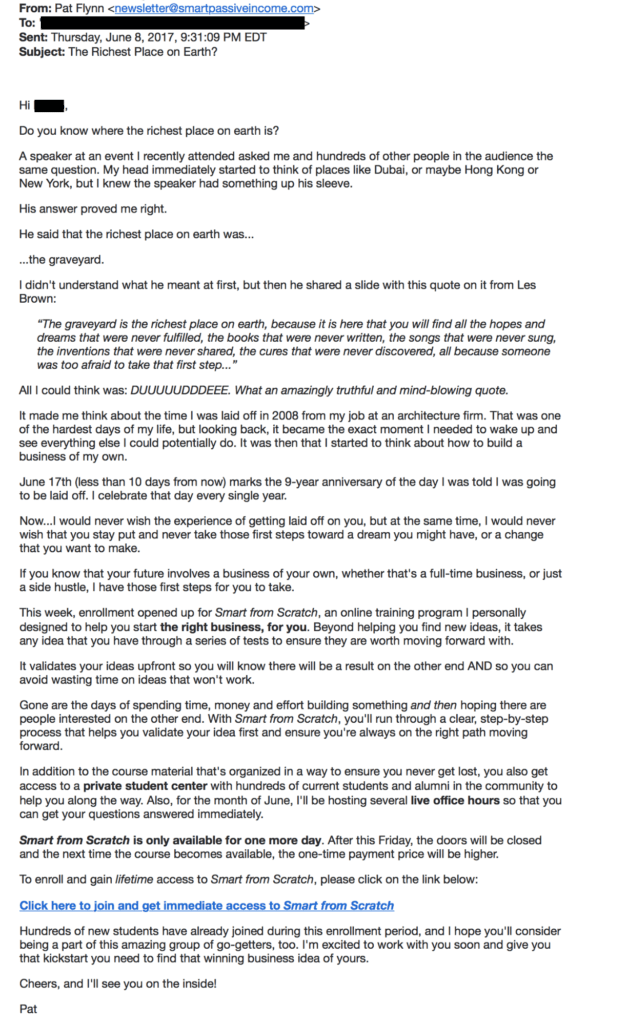
As far as what CTAs to include in your emails, we’ll go over that in more depth further down this email marketing guide.
For now, let’s move on to talk about the all-important task of building your email list.
How to Build Your Email List with Quality Subscribers
Want to learn how to get more email subscribers? I’ll tell you what’s not going to work. Telling people, “Hey, subscribe to my newsletter.” If you’re doing that, you’re basically just saying, “Hey, I’m going to send you more emails!” People don’t want more emails. People want something of value in exchange for joining your email list.
So what can you give them in exchange for their email address? Thankfully, there are many tactics to grow your email list. But the overall key—the email marketing strategy—has to be to provide value. You need to give people a reason to join your list.
Up next, I’m going to share several different methods and types of email marketing content you can use to deliver value and grow your email list with well-qualified subscribers.
1. Lead Magnets
One of the best ways to do so is through a tried-and-true method: offering a lead magnet—a valuable piece of content—in exchange for someone’s email address.
Lead magnets have been a popular method to gain signups for a while, and for good reason. Although the types of lead magnet that are most effective have evolved (more on that in a second), a lead magnet is still a great way to incentivize people to join your list. As always, the key is to provide something of value—ideally more value than the person might expect to receive without paying anything.
One more piece of advice when it comes to lead magnets. You see, times have changed. Back in the day, when I started building my email list, it was hip to offer the biggest, most comprehensive lead magnet possible—I’m talking a thirty-to-fifty-page ebook or PDF file. But this is no longer something people want to download. They don’t want to spend their time slogging through fifty pages—they want the quick hits, the information that will let them hit the ground running.
Here are a few options:
- A mini-course. A short training that delivers a ton of value in a small package while showing the person that you’re serious about helping them learn.
- A book chapter. If you’ve written a book, or are thinking about writing one, you can offer your first chapter for free in exchange for someone’s address.
- A transcript. If you do any video or podcasting, you can take your transcripts—the text files with the words you’ve recorded—and put them into a PDF file, then offer it in exchange for an email address.
2. Upgraded Content
A content upgrade is bonus content that people can get access to in exchange for their email address. After a post or podcast episode, you can offer access to a downloadable that enhances the experience with that content. This is essentially a smaller, unique, bite-sized type of lead magnet that relates directly to what people are already consuming.
This strategy is used by lots of top email marketers. One person who uses this strategy incredibly well is Amy Porterfield, who puts content upgrades in nearly every single post!
Amy Porterfield does upgraded content awesomely well. In the page for this podcast interview with Darren Rouse, she offers a free download with content that expands on the interview in exchange for your email address.
![An example of an email marketing content upgrade from Amy Porterfield. On the page for the podcast episode, there is a pop-up that reads "Free Download: Sign up to access Darren's [the episode guest] 'How to Boost Your Blog's Business Potential: ProBlogger's Top Ten Tips to Growing Your Email List and Selling More Online.'"](https://www.smartpassiveincome.com/wp-content/uploads/2024/02/image5-1024x875.png)
Although upgraded content can work like a charm, the big struggle most people have with it—and the reason many don’t use it—is the fact that it requires additional work. We spend all this time creating a unique, valuable post, podcast episode or video, and then we have to do even more work after that? You should know this by now, but results down the road don’t come without some hard work up front, and if building your email list is a major goal for you (which it should be), upgraded content will work if you put the work in.
Here are a few ideas:
- A PDF file that lists tools and resources related to your topic.
- A quick-start guide to a product or process you’re teaching that may be fairly complicated.
- Access to a prerecorded bonus webinar related to the content in the post.
- A checklist that allows people to follow along and make sure they’re doing things right.
As I mentioned above, there’s a lot of overlap between upgraded content and lead magnets. The key differentiator is that upgraded content is always going to be closely related to the content the person is reading. For instance, if your focus area is video blogging, you might place a checklist for getting started with a particular camera at the end of a blog post reviewing that camera. But if you wanted to place a lead magnet on your homepage, you probably want to go with something more general (e.g., “The Top 5 Things Every Beginning Video Blogger Needs to Know”).
3. Free Webinars
You can also collect email addresses when people register for webinars you host.
Simply registering for a webinar provides a valuable first point of validation, because it tells you that person is interested in the topic. And if only a few people register, that’s helpful data too! That way you’ll know that this topic may not be relevant to your target audience and that you should place your focus elsewhere.
I know a lot of people who use webinars to get in front of an interested audience. You get people to register for a webinar related to a particular topic.
You can use webinars to grow your list, as well as to sell to your existing list. At the end of the webinar, you can invite them to stay in touch with you, or even pitch them on a product or service related to the webinar topic.
But even if you don’t know what you want to sell yet, or you’re just hesitant to pitch during your webinar, that’s totally fine. The potential to grow your email list with relevant subscribers is excellent. In fact, if you’re just starting to learn how to do email marketing, it may be more wise to focus on the list-building. There’s no need to rush the sale!
Webinars can also help foster trust and affinity between you and the people who attend by creating a memorable experience. You get to talk directly to people and start building a relationship with them, and even answer their questions. A webinar can be a great introduction to your brand and your teaching style. And it doesn’t hurt to work in a quick win.
Do it right, and people are going to be super thankful for the time they’ve spent the time with you—and way more attuned to hearing more from you in the future.
Check out my best email marketing services post to learn more about the tool I recommend for hosting your webinars.
4. Giveaways
Contests or giveaways can be a great way to augment your email list with excited new subscribers. But sadly, these kinds of promotions often get a bad rap.
You might even be thinking right now, “Giveaways seem kind of cheesy and sleazy. Do they really work at growing your email list?” The short answer is yes, definitely! But unfortunately, giveaways carry a stigma among many people, and this stigma is based on a few common misconceptions.
Back in 2018, I had a great conversation on my podcast with Noah Kagan, the founder of AppSumo. Noah’s company makes a website plugin called KingSumo that you can use to easily set up giveaways on your site. We talked about how giveaways can be a fruitful source of new email subscribers, and covered the common and unfortunate misconceptions about giveaways that can lead a lot of people to overlook them.
Let’s break down those misconceptions now, and talk about how you can use giveaways to boost the ranks of your email list with the right kinds of subscribers!
Misconception 1: People Who Enter Giveaways are “Bad” Subscribers
This one is the big one—a lot of people think that those who enter giveaways are just looking for a freebie, and so they’re not going to be “high-quality” subscribers. However, KingSumo has found that as many as 40-50 percent of giveaway subscribers stay on board; contest subscribers have been responsible for 30 percent of AppSumo’s revenue! To help your odds, you can take a few steps to make the most of your new subscribers:
- Use a double opt-in process. This means new subscribers need to click yes on a confirmation email before they’re fully subscribed.
- Give away a product that’s going to be interesting to your ideal customers, but not as exciting to others. This will help attract your target audience—the people more likely to want to stay on your list.
- Three months after your giveaway, unsubscribe anyone who hasn’t opened or clicked any emails. You can do this automatically through most email service providers.
People who enter giveaways don’t need to end up “low-quality” subscribers, as long as you screen them the right way and clean up your list after the fact.
In 2016, I ran a giveaway on my site for my favorite books of the year.
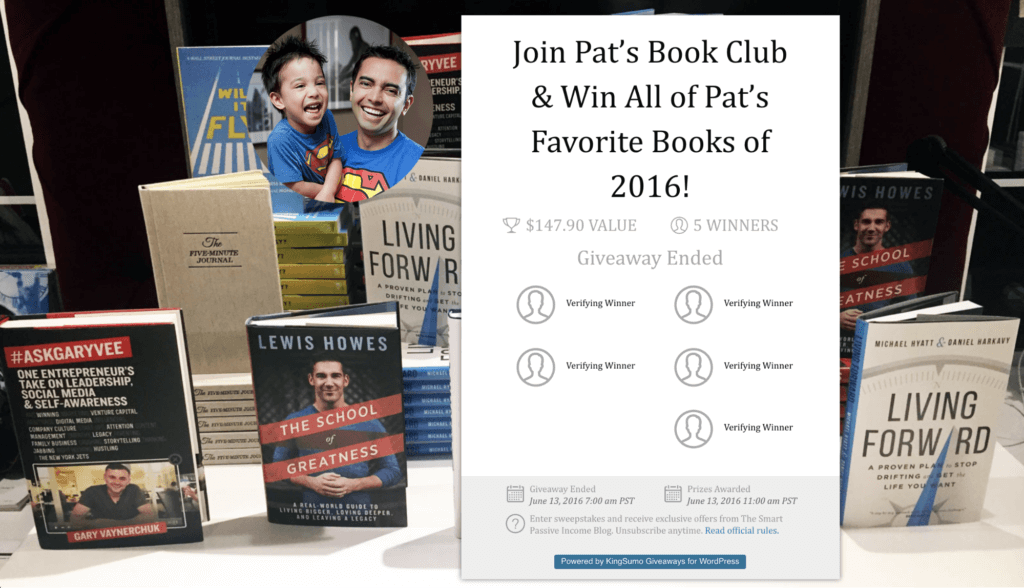
Misconception 2: You Need a Huge Audience
What if you don’t have a huge audience? That’s okay. Use what you’ve got. This can include posting on your social media pages or profiles (LinkedIn, X, Facebook, and Instagram), emailing your current subscribers, and advertising the promotion on your website (use Sumo.com). You could even make a YouTube video about your giveaway, and submit the contest to a subreddit like /r/giveaways.
Your audience is bigger than you think, especially when you take into account the shareability factor with giveaways.
Misconception 3: You Need a Huge Prize
Finally, you don’t need a huge prize! Not every giveaway has to be for a brand new iPad Pro (and in fact, I strongly recommend against doing this.) Noah’s proof: He got 6,411 email subscribers by giving away a Seth Godin book collection that cost him just $60!
The more focused and relevant the prize to your target audience, the more interested people will be—and the fewer $$$ you’ll have to throw at a high-tech prize (cough, cough, iPad) that will appeal to lots of people.
5. Promotion via Social Media
Social media is a fantastic means to grow your email list and increase your ranks of raving fans and future customers.
Unfortunately, a lot of business owners and marketers get stuck on the “vanity metrics” that tend to get emphasized in social media land—things like engagement and followers. There’s nothing wrong with tons of engagement or having a super-duper long list of Facebook followers, but if you’re not using your social media presence to build your email list, you’re missing out!
Social media is a perfect tool to use in conjunction with the other tactics and best practices shared in this email marketing guide. You can link from social media to your blog posts or landing pages that contain lead magnets or upgraded content, promote your webinars, and share links to your giveaways.
The link in this tweet goes to a landing page where people can sign up for a webinar in exchange for their email address.
![Screenshot of one of Pat's Tweets promoting a webinar. It reads "1500 registrants and counting for my upcoming Affiliate Marketing Masterclass free training this week. Register here: [link]."](https://www.smartpassiveincome.com/wp-content/uploads/2024/02/image4-1024x763.png)
But above all, if you want to successfully turn your social media conversations into engines for email list-building, make sure you heed my cardinal rule of social media: think of it like it’s one giant party.
Imagine you’re at such a party. At this party, there are tons of different people having different types of conversations. Now, imagine going up to a group of people who are having a conversation about something and interrupting with, “Hi everyone! My name is Pat Flynn! Here are some cool products you can buy from me. Check ’em out!”
That’s not going to go over very well. It’s just plain rude, and it doesn’t make a good first impression. You’re not going to impress anyone—and you’ll never sell anything that way. If you want successful people to pay attention to you, you have to pay attention to what they are talking about first.
So join and add value to the conversations that are happening—don’t interrupt them. Be interested first, and they may be interested in what you have going on too. Make friends, build relationships and help others, and people will eventually find what you have to offer, because they’ll be genuinely interested in you!
That’s how to use social media—as a way to strengthen and build the relationships you have with your target audience, so they’ll want to stay in touch with you. Once you start doing that, it’ll be a natural next step for many of your followers to join your email list.
Plus, getting your social media audience onto your email list is just smart, because your email list is a much safer bet than any social media platform could ever be. Twitter or Facebook can change the rules whenever they like; they could even (gasp!) shut down your account. And in either case, you wouldn’t be able to do much about it. And what about your website? You own that, right? In a sense, but it can be hacked. But no one can really take your email list away from you—all you need is a backup list of contacts and a way to email them.
For more on how to start your email list check out my in-depth guide on this!
Taking Your Email Marketing to the Next Level
I hope the tips and tactics above give you a great starting point to growing your own email list.
Growing your email list with dedicated subscribers early on is one of the best ways to build a successful online business. It took me more than a year after starting my first business to start my email list, and it’s a mistake I still regret.
“But that’s not all there is,” you’re thinking, “… is it?” Of course not! What we’ve talked about so far is just the tip of the iceberg. Next we’ll go deep into email marketing best practices to help you get the most out of this invaluable email marketing strategy.
Email Marketing Best Practices
A big email list is great. But it’s not the size of the list that matters—it’s how excited, engaged, and responsive your subscribers are. If you have a list of 100,000 people but only 5 percent of them open your emails, then you basically have a list of only 5,000 people.
Not so impressive when you look at it that way, right?
I’m fortunate to have built a list of responsive subscribers. My open rate (the percentage of people who actually open the emails I send) averages around 55–60 percent per email, which is much better than typical open rates for my industry, which hover around 20–30 percent.
I also get a lot of engagement on the emails I send—people clicking the links and even replying to them. Reading is one thing, but you also want people to take action!
In an ideal world, we’d all have big email lists full of responsive, engaged subscribers.
But here’s a scenario I hear about all too often: Someone has been building their audience and growing their email list for a while. At first, their open rates and click-through rates are really good, but over time they begin to slowly drop off.
This is sadly pretty normal. It’s common to find that the early emails a subscriber receives—the first one or two they get from you when they sign up for your list—get the highest open rates. But with each successive email they receive, the open rate goes down. The excitement wears off. Plus, as your list grows, you may find that some of your new subscribers are not the best fit for you, and they’re not as excited to read and engage with your emails.
I’m going to share some email marketing best practices to help you enhance not just your open rate but your response rate too—how much people are engaging with, replying to, and clicking links in both your autoresponder and broadcast emails. I’ll share my guidance for creating effective autoresponder email campaigns, using email segmentation smartly, and culling your list to maximize the responsiveness of your audience.
I’m a big fan of the quick win. And I want to give you five quick wins you can achieve with all your emails. Here are my top five tips for writing great emails every time.
My Five Email Marketing Best Practices for Success
Rule #1: Keep Your Email Formatting Simple
You want people to actually read your emails, not get distracted by the design and formatting. A little branding (like a logo) is okay, but even then not all email service providers (ESPs) include options for images. Plus, adding designs to your email just means another opportunity for something to break or look funky.
I suggest sending emails like you’re sending them to a friend, which is what we want to do because we’re looking to build a real relationship with our subscribers. Would you send a super fancy, heavily designed email to a friend? Not usually.
Typically you just write something up and hit send. Just text on a white background. That’s what has always worked best for me.
Most of my emails look like this, and that’s on purpose.
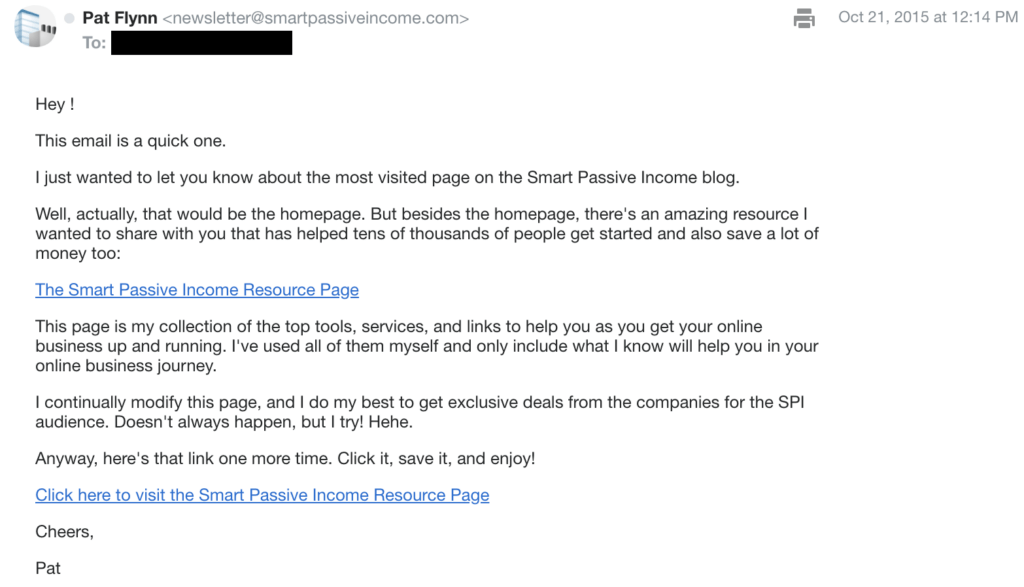
There are exceptions, however. If you have an ecommerce store, your subscribers may expect more structure and design in your emails, with lots of links and things to look at. But in most cases, eliminating or cutting down the design formatting for email is the best thing to do.
If you’re just starting to learn how to do email marketing, keeping it simple is definitely my suggested approach. And if you’re having issues with your emails not making it to people’s inboxes and ending up in the spam folder, stripping down your emails could help you get them through the filters.
Rule #2: Give Each Email a Goal and a Specific Call to Action (CTA)
When you craft any email, you should always ask yourself: “What’s the purpose of sending this?” Each email you send should have one specific goal. Maybe that goal is to get people excited about your latest podcast episode or YouTube video, or to drive them to the sales page for your latest product.
Each email should also include one specific CTA.
This is important because if you include too many CTAs, you’re less likely to get people to take that action. This happens because of the “paradox of choice,” where more choices actually can hinder a person’s ability to make a decision. Also, when you include more than one CTA, you’re usually not focused and honed in on your messaging within your email, and it just becomes far less effective.
You can have multiple instances of the same call to action within an email, but it’s a good rule of thumb to pair one email with one CTA.
One email = one CTA.
Of course, there will be exceptions. But as with your email formatting, generally speaking you’ll be making it easier for people to follow through on the intended action when you keep to a single goal and CTA in each email.
Rule #3: Keep CTA Links on Their Own Line
This is a small rule that’s more tactical, but it matters big time. Whenever you include a CTA link in an email, keep the link on its own line of text.
Why does this matter?
It matters because a lot of subscribers will open your emails on a mobile device, and many of them may suffer from “fat finger syndrome.” In other words, it’s not always easy to click on a link when it’s surrounded by other text.
Just one CTA per email, whenever possible.
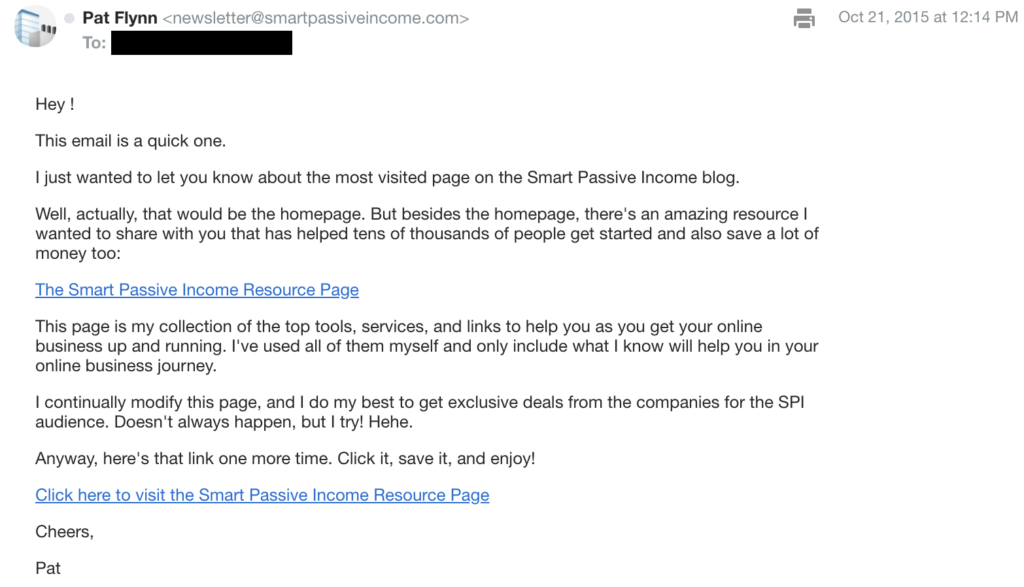
When you place a link on its own line, you won’t have to worry about that anymore, and as a byproduct your CTA will also become more obvious. Make it easy for people!
Rule #4: Always Preview Your Emails Before You Hit Send
Please preview your emails before you hit send! This means not just reading the email in draft mode, but sending yourself a copy of the email (which most ESPs allow you to do) before you pull the trigger.
When you receive your test email, read your email copy out loud and click on all of the links to make sure they go to the right places. I know you’re anxious to hit send after writing your copy, but it’s not worth the potential disaster of sending an email where the links don’t work. Plus, you’ll likely notice small spelling and grammar issues that you can take care of first before the “grammar police” lets you know about it later.
You may also want to check your emails on your mobile device so you can see what that experience is like.
Get in this habit, and you’ll save yourself a lot of trouble down the road.
Rule #5: Subscribe to Your Own List
Finally, subscribe to your own email list. This will help you understand the exact experience a potential subscriber will have after they sign up.
If you’re just starting your email list, become your first subscriber. As you’re setting up your autoresponder email campagin, you can catch any required frequency or rhythm changes before the emails start going out to real subscribers.
Those are five quick and easy ways to send better emails. If you need more ideas about what and how to write, subscribe to the Email Marketing Cheat Sheet.
Download the FREE Email Marketing Cheat Sheet
You have your email list set up, but what should your emails say? The Email Marketing Cheat Sheet teaches you exactly what to send to your list, including 10 cut-and-paste-templates for the different types of emails your audience will look forward to.
Now let’s dig a little deeper, by sharing some of my best tips for creating awesome autoresponders.
Tap Into the Power of Autoresponder Email Marketing Campaigns
Perhaps the most important step to cultivating engaged email subscribers is to create a great autoresponder email campaign, one that gets people hooked from the very first email and eager for each successive email.
Autoresponders help you nurture your subscribers, by building their trust and teaching them more about what you can offer.
And the best part? You create these emails ahead of time, so you can start building a relationship with each new subscriber with little ongoing maintenance.
And the success of your autoresponder all starts with email number one. Let’s talk about why the first email is the most important, and a couple more simple but powerful tips to keep in mind if you want that first email to be as effective as possible.
Keep Your First Email Simple (and Deliver What You Promised!)
That first email in your autoresponder is a do-or-die opportunity to spark the interest of your new subscriber. If someone doesn’t open your first email, the likelihood that they will open your later emails is much lower. You need to hook them.
When you’re thinking of ways to get people amped up about that first email, it can be tempting to go over the top and try to manufacture excitement by using lots of exclamation points or all caps, or creating a false sense of urgency.
I ask you now: Please don’t beat your subscribers over the head with the wow factor. Your email is likely to end up in the spam folder.
Instead, you can make it more likely someone will open and engage with your first email simply by giving them what they’re already expecting.
We talked above about the power of the lead magnet—a valuable piece of content that you offer in exchange for someone’s email address—to entice people to join your list. You can succeed with your first autoresponder email simply by keeping it super simple and delivering people what you promised them!
You see, if someone signs up for your list in return for receiving a lead magnet, they’re already primed to expect that lead magnet. So, deliver it! If someone’s excited to get your lead magnet, then make it as easy as possible for them to access it. Your first email can be focused entirely on delivering your lead magnet, with a simple subject line like, “Here’s the free resource you requested.” Get right to the point—don’t waffle on about something else before you give them the link to the lead magnet. Don’t wait until the P.S. line to tell them where to find it. And definitely don’t wait until the second email to deliver it.
I’ve seen too many people miss out on an easy opportunity to grab their new readers’ attention and interest in this way, so don’t make the same mistake.
Now that we’ve covered how to create a great first email, let’s turn our attention to how you build the rest of your autoresponder campaign.
The 3 Best Types of Email Marketing Autoresponders—and One to Avoid
An autoresponder is like a journey you take your subscribers on, or a story you tell them.
Below, I’ll share with you 4 different examples of email marketing using autoresponder email campaigns, including the one I use—the one that scores me really high open rates—and one you should definitely avoid.
Autoresponder Email Marketing Campaign #1: The Bait and Hook
The first autoresponder email campaign I want to talk about is the “bait and hook,” and it looks something like this:
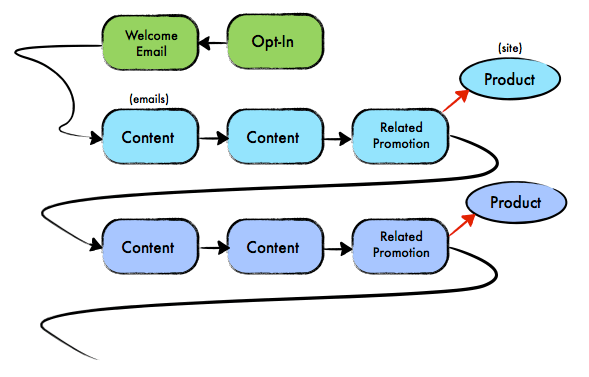
The basic premise is that you first share valuable content related to a particular subject (the bait), and then introduce a product or solution a little later (the hook).
I see this approach used by a lot of people, probably because it can work well in many cases. The content-based emails provide value while also creating awareness about a particular problem or subject, one that the promoted product is aimed to solve or address.
With that said, you have to be cautious if you choose this method. Because this is a common autoresponder email strategy, people have also become more attuned to it. There’s a difference between creating awareness and building hype, and people are more savvy about the distinction.
That’s why you must take great care in what goes into all of the emails in the series. Emails must be crafted carefully because it can be really easy to sound like you’re just leading up to a product, in which case the emails can be a real turn-off and you’ll find a lot of your subscribers will unsubscribe from your list.
The most powerful way to avoid that issue is to deliver a ton of value in the content-based emails. Make those emails stand on their own and give people more than they expect to get from you, so that they don’t just feel like you’re building up to eventually selling them something.
When you get to the promotional emails, continue to deliver more value than people expect! The promotion itself can be a small part of the email, like a delicious after-dinner mint following a deeply satisfying four-course meal.
Autoresponder Email Marketing Campaign #2: The Ground and Pound
This next framework for building an autoresponder email campaign is the most aggressive, but it can still be effective and profitable in some scenarios. The “ground and pound” approach works like this:
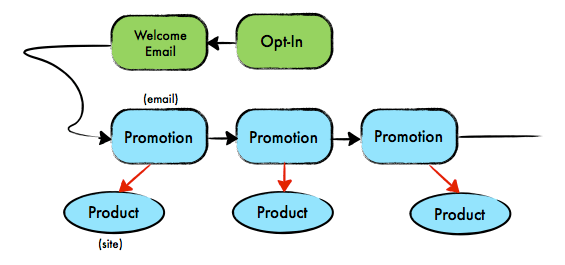
I know what you’re probably thinking: I just told you to be careful about promoting things via email, so being more aggressive there is a big no-no, but in some situations the ground and pound approach can actually work to a website owner’s advantage.
The key is to set the right expectations before someone even gets that first email from you.
For example, sometimes an autoresponder campaign is introduced to an existing customer—someone who’s already purchased something from you. They’ve shown their willingness to pay money for the things you create or provide. You could add that person to an autoresponder series built around the ground-and-pound approach, with promotional emails containing upsells for other products that complement the person’s initial purchase. In this case, the customer has already shown themselves to be a buyer, and those kinds of promotional emails may actually be welcomed.
As always, the emails should deliver value even if the person never buys the thing you’re promoting.
The ground-and-pound sequence works best if you manage the expectations of your subscribers appropriately. If you tell potential subscribers that by signing up they will receive promotional emails from you, then those people will expect it—no harm, no foul.
Let’s say you have a photography site, and you send a weekly email newsletter that contains exclusive deals and tips about photography products and gear. A ground-and-pound approach could be your best friend, because your subscribers already expect you to tell them about photography products they might want to purchase.
But you should exercise caution with this approach. It won’t work in every situation, so use common sense and think about your audience, their wants and needs, and the expectations you need to set with them before you start with a sales-heavy autoresponder like the ground and pound.
Autoresponder Email Marketing Campaign #3: The Pat Flynn
This next one is called “Pat Flynn” because—surprise, surprise—it’s how I’ve put together most of my autoresponders! I’m pretty sure I’m not the first one to do it this way, but to be honest, I’m not familiar with anyone else who does (and I’m subscribed to a lot of email lists).
The Pat Flynn works like this:
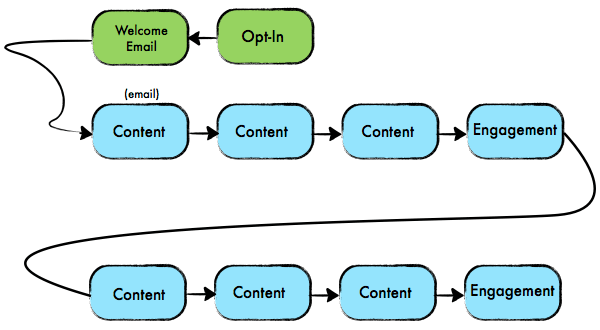
There are two components to the Pat Flynn autoresponder series: content-based emails and engagement-based emails.
Content-based emails are tips and tricks that I provide to my subscribers that can’t be found anywhere else on my site or my social media channels. This exclusive content helps keep people on my list and wanting to hear from me.
Beyond this killer content, I use the Pat Flynn autoresponder to engage with my subscribers—and by “engage” I mean try to get them to respond directly to me. In one particular autoresponder email, for example, I ask my subscribers what they wish I’d write a blog post about. This makes people feel like they are involved with the content on my blog (which they are, because I use a lot of the responses as inspiration for upcoming blog content), and it helps them connect with me on a more personal level.
Hitting reply is a form of taking action, and here’s the thing—any type of action taken by an email subscriber is a win.
Now, you might not like this idea because you “don’t want to get a ton of emails” from your subscribers. If that’s the case, you’re going to miss out on opportunities for engagement—opportunities that may not lead to an immediate click or a sale, but could help build a relationship that eventually does.
The real magic of this approach is two-fold:
- I’m establishing credibility and building relationships in a non-evasive manner, which keeps people on my list and opening emails. By not being aggressive and promoting anything directly in my emails, the open rates and response rates on all my emails are pretty high.
- Some of the content-based emails send people back onto another platform (like my website) where I have more opportunities to keep them engaged with great content and yes, promote my own products and those for which I have affiliate relationships.
The second point is probably better illustrated by the diagram below, which is the same diagram as above, with a few more details:
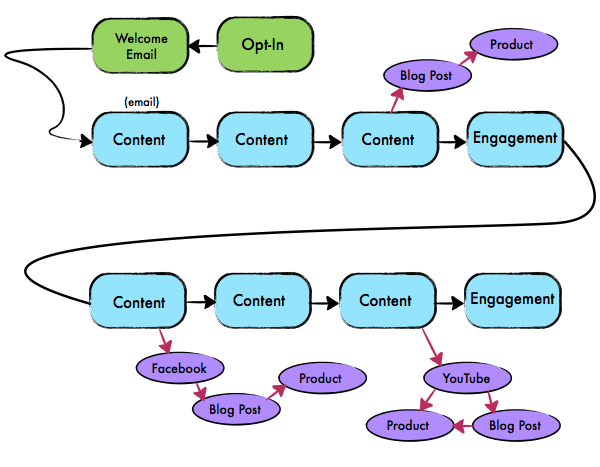
This doesn’t represent the exact order of how everything happens, but it gives you the main idea.
The key is that I’m not promoting anything in the emails; instead, I use them as a medium to connect with my readers, delivering them valuable content and offering them opportunities to respond. Any selling done via the emails in this type of series in indirect; I may send people to my blog, where I promote my own products and my affiliate products.
One of the downsides to the Pat Flynn approach is that any sales transactions that occur are harder to track. In more promotion-focused autoresponder email campaigns (like the ground and pound), it’s easier to tell how much money you’re earning directly from the emails in that series, because someone is typically clicking a single link in the email to a sales page on your website. This makes it easier to connect the link clicks from that email with the sales or commissions earned as a result.
But when the path from first click to sale is longer, as it can be in the Pat Flynn series, it can be harder to know how successful those emails are at driving sales.
Here’s an example. Let’s say someone becomes a fan of me on Facebook or subscribes to my YouTube channel as a result of one of my emails. They may not buy anything from me that day, week, month, or even year. But, some of those people may eventually find a link to a post on my Facebook page or watch a newly uploaded video on YouTube in which I’m promoting something, and buy it.
Or maybe they’ll end up on my blog as a result of one of my emails and see an ad in the sidebar. There are multiple points of possible transactions that can stem from clicking a link in one of my emails. That’s why this kind of series is much more valuable as a relationship builder rather than a sales driver.
Is this the best way to do things? It is for me, but for you it’ll depend on your niche and your audience, so think about it from your readers’ perspective and what they would want to get in your emails.
Autoresponder Email Marketing Campaign #4: The One To Avoid
Now that we’ve covered three potential options for your autoresponder series, let’s talk about an email sequence you should avoid at all costs. Unfortunately, this is the sequence most people usually have:
🤷♀️
A lot of people set up their email lists and focus purely on broadcast emails. Broadcasts are great, but if you skip the autoresponder sequence, you’re missing out on valuable opportunities to connect with your audience and drive passive income.
These aren’t the only ways to build an autoresponder series, but they should give you a good starting point.
How Long Should Your Autoresponder Be?
Now that we’ve covered some options for how to build autoresponder email campaigns, let’s talk about how long your autoresponder should be, and how to space your emails.
First, I recommend erring on the side of a longer autoresponder series. Some people create short autoresponders because they “don’t want to bother” their subscribers too much, but guess what? People signed up for your list because they want to be bothered! Not bothered in the sense of annoyed, but in that they want you to teach them something, to give them valuable information and resources they wouldn’t be able to easily get elsewhere.
If you’re focused on delivering as much value as possible, then making your autoresponder email campaign a bit longer is a great way to do that. This person has agreed to receive your emails, so make the most of the opportunity.
A longer autoresponder series gives people more touchpoints, more opportunities to learn from you and become a fan of your brand, more chances to engage with you, visit your blog or YouTube channel, respond directly to you, and even buy something from you.
Next, how far apart should your emails be?
I prefer to err on the side of spacing them about a week apart. I know others who have autoresponders that send an email every day.
As a baseline, you definitely want to make sure someone’s not getting multiple emails from you in one day. But beyond that, how often you send emails depends on the content of those emails. Are your emails really dense, with tons of information and action steps that will take your reader some time to understand and implement? If so, waiting a week to send the next email might be wise. But if your emails are short and to the point, and don’t require the reader to go and build a treehouse before they get their next email, then you can probably safely space them closer together, perhaps every two or three days.
When it comes to email timing, you also want to be aware of not just what’s happening in a single autoresponder email campaign, but with your emails as a whole. As your business grows, you may have multiple autoresponder series for different topics, along with regular broadcast emails. This can increase the complexity of your email list and make it harder to track exactly what each person is receiving from you and how often, and to make sure that you’re not overloading them with emails.
Want more information on creating autoresponders? Here’s my 20-minute deep dive into creating an awesome autoresponder email marketing campaign.
I use Kit to help me manage all this complexity. Kit makes it easy to set up an autoresponder using their “Visual Automations” feature, which lets you map out all the emails in your autoresponder and see how they fit together. [Full Disclaimer: I am a compensated advisor and affiliate for Kit.]
Our next big tip has to do with email segmentation—how to create “mini” lists from your main email list so you can better talk to the different groups of people in your audience.
Put Email List Segmentation to Work for You
Segmenting your email list is one of the most powerful ways to increase the effectiveness of your email marketing.
Email segmentation is dividing your email list into smaller sets of subscribers based on certain criteria. These criteria can include things like open rate, clickthrough rate, demographic details, interests, purchase history, and other behaviors.
You might be thinking, that seems like a lot of trouble. Is it worth it? But if you go about it the right way, segmenting your email list is definitely worth it—and I’ll explain why.
Why You Should Segment Your Email List
So why segment your email list? Simply, it allows you to be more targeted about how you talk to different people in your audience. Because, guess what? Not everyone is the same. They have different needs, concerns, and ways they talk about things. In my case, although my audience is composed of various people all trying to build their own online businesses that will help them serve their audience and provide passive income, these people may be at widely differing stages of building their individual business. So I’m not going to talk to the person just starting out the same way I would someone else who’s been building their business and growing their audience for five years.
The answer, when it comes to email, is to organize the people in your list into categories so that you can tailor your language and your email strategy to each category separately.
Remember, the more you can use email to talk directly to a person’s needs, wants, fears, and dreams, the more likely they’re going to want to engage with you and your brand—and the more likely they’re going to stay on your email list.
All it takes is one email that doesn’t align with a subscriber to convince someone “this is not for me anymore,” and lead them to click unsubscribe.
How to Segment Your Email List
So how do you go about segmenting your email list? The first step is to understand that you want to segment your list in a way that ensures you’re sending people emails they’re likely to be interested in.
You may need to do some research to figure out a good place to start. But I don’t suggest creating a lot of segments, especially right away. More segments means more ways you’ll need to tailor your communications, which means more work for you.
My email list is split up into just three main segments, based on the stage people are at with their businesses. I created these three segments after doing research on my entire audience and figuring out a way to split up everyone into three clean categories based on how much revenue their business was generating.
Once I’d identified the three segments, I needed to start placing people in them. To initiate this process, I sent an email to my entire (pre-segmented) list, asking a simple question:
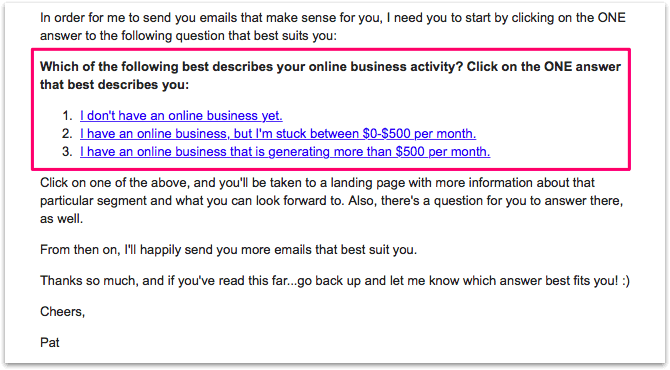
Which one of the following describes you?
- I don’t have a business yet.
- I have a business, but I’m struggling to make over $500 a month.
- I have a business, and I’m making over $500 a month.
That’s how I’ve divided my audience. Depending on which link they click, they get put into a specific list with its own autoresponder series. But it’s definitely not the only way to segment your list. One of the most basic and common but useful examples of email segmentation is this:
You have a single product to sell, along with an email list. You segment your email subscribers into two groups:
- Non-buyers (prospects)
- Buyers (customers)
For group 1, you send these kinds of emails:
- Valuable, educational content to build trust and authority.
- Success stories to show proof of concept and build even more trust.
- Emails meant to drive sales.
If a subscriber from group 1 makes a purchase, they are no longer a part of the “non-buyer segment,” and have now entered the “buyer” segment, where they will get a different set of pre-written emails, including:
- A thank-you email for purchasing the product, along with important information about how to access their product.
- A follow-up email two days later to make sure everything is running smoothly and to check up on their progress.
- A survey email fourteen days in to gauge what they like and dislike about their experience so far with your product.
- A free and unexpected gift twenty-eight days later as a thank you, which happens to be two days before they get billed for their membership. The gift reminds them how great the purchase was, and when they have to pay the next installment, they are more likely to be happy with it.
- A promotion for a secondary product or course you have for the same audience.
The prospect vs. customer example is simple, and is a great place to start if you sell products. Each group deserves different types of email marketing, and your buyers would hate to see an email pitching a product they’ve already purchased.
The easiest way to start applying this email marketing strategy is to split your list into two segments. You’ll have to think about the most logical criteria to use for this based on your business. Perhaps it’s people who’ve purchased something from you vs. people who haven’t. Or maybe it’s people who’ve responded to at least one email vs. those who haven’t.
In any case, email list segmentation is a must-have strategy if you want to talk to the different groups in your audience in the best way possible and get the most out of your email list.
Our final big tip is all about cleaning your email list—making sure that the people on your list are the ones who really want to be there.
Clean Your Email List to Maximize Quality
My next big email marketing tip involves—gasp!—deleting some of your subscribers from your list.
That’s right: I’m asking you to let some people go. One powerful way to improve your email open rates and engagement is to do a regular “spring cleaning” of your email list.
It can also help you save on the fees you pay your email service provider, since many of them charge according to the size of your list
But the biggest benefit is that you’ll only be sending emails to people who want to receive them.
So how do you go about cleaning your email list? There are a couple ways to do it, and one is definitely preferable. Let’s talk about them both now.
How Not to Clean Your Email List
So how do you go about removing inactive or unengaged subscribers from your list so you have a really engaged, active audience?
We don’t often know how people use email on the other end like this. So I have a big email list and I send emails out all the time, and not everybody opens them.
It’s technically easy to do. Most email service providers give you a way to track which subscribers are opening your emails and clicking links and which ones aren’t paying much attention—the latter ones are “cold” subscribers. These are the people who haven’t opened an email from you for a good period of time, usually around 90 days.
You can simply log in to your email service provider, pull up a list of cold subscribers, and delete them. Boom! Presto! You immediately have a more engaged audience!
Depending on your email service provider, you should have some way to identify your cold subscribers. Thankfully, this is something that Kit makes it really easy to do. (You just have to go to your Subscribers page and use the Subscribers dropdown to select only Cold Subscribers.) [Full Disclaimer: I am a compensated advisor and affiliate link for Kit.]
I really appreciate that Kit makes it easy to see who your cold subscribers are. Because guess what? When you delete people from your list, Kit may lose money because your email list just got smaller. Since Kit and similar companies make money based on the number of people on your list, it’s to their advantage for you to have a larger list, even if it’s not full of people all equally interested in what you have to say.
Making it easy to improve the quality of your list—even if it costs them money—is one of the reasons I love Kit, why I love Nathan the CEO and founder, and why I’m an advisor to the company.
At the same time, I definitely don’t recommend you use this feature to pull up a list of your cold subscribers and delete them from your list right away.
Why?
I’ve heard from people who have been removed from email lists they didn’t want to be removed from.
Did you know that email marketing providers determine whether someone opens an email based on whether or not a 1px transparent image was loaded in the email? If someone has disabled images in their emails—even if they’re reading all of your emails—they won’t show up as having opened those emails.
Or sometimes, people might be reading a preview of your emails—the subject line and the first paragraph or so—and even getting good information and value from that preview, but since they’re not technically opening the email, this won’t show in your metrics.
So, you have to be careful here. They’re gone, but maybe they shouldn’t be.
Open rates don’t always tell the whole story.
Thankfully, there are some smarter ways to go about cleaning your email list. Here are two better ways to go about it.
Email List Cleanup Strategy #1: Okay
We’ve established that just deleting your cold subscribers with no warning isn’t a smart way to go about cleaning your email list.
Instead, you want to make sure that when you delete someone, they’re actually a cold subscriber who’s no longer interested in hearing from you—rather than someone who’s just lost track of you and needs a reminder of how they can benefit from what you’re sharing or teaching.
A better option is to send your cold subscribers an email asking if they want to continue hearing from you. Then, if they don’t respond within a certain amount of time—let’s say a week or so—you delete them from your list.
It could be as simple as saying, “Hi! Please click on the link below to stay on my email list. If you don’t click on it in the next week, I’ll delete you from my list.”
That said, I would still be very careful about just deleting all your cold subscribers as soon as that week is up.
It’s one way to do it, but it’s not my favorite way. It’s the easiest way to clean up your list, but it’s not the best.
Why? Well, some people might miss that email! If you only give them one opportunity, then that’s it—no second chances.
What do I recommend you do instead?
Email List Cleanup Strategy #2: Better
The second option is much safer. You’ll be creating a three-mail mini sequence that will give people a fair chance to determine if they still want to be on your list. This will let you find out who’s truly cold—and who’s just a little chilly.
The first email should be a gentle nudge, and not aggressive at all. Subject lines like, “Haven’t heard from you in a while” or “Are you still there?” are good options to get people’s attention and open the email.
Of course, you want people to not just open the email, but to take some sort of action that indicates their interest. It could be asking them to reply with a simple “yes” or “no.” Or you could set up custom links for the “yes” and “no” answers that lead to a landing page thanking them for responding and confirming their response.
What if someone doesn’t respond to the first email? Then it’s time for email number two.
In the second email, you can be a little more aggressive. Go with something like, “I noticed you didn’t respond to my first email.” The call to action in the body of the email will be the same as the first email, but with a little more urgency.
If you have no luck with the second email, you can send one more.
How to clean your email list, the audio version.
Your final email can be a little more aggressive. The more aggressive you are, the more likely you are to capture people’s attention—but use your judgment. You have less to lose with this final email, but you don’t want to upset people or give them a bad impression of you. A subject line like “This is your last chance” creates the right amount of urgency without being mean or harsh.
The call to action will again be the same as the first two emails, but you definitely want to ramp up the urgency so people know it’s their last chance to stay on your list.
How Often Should You Clean Your Email List?
At this point, we’ve covered two options for cleaning up your email list and removing cold subscribers: the “okay” option (one email) and the “better” option (a three-email sequence).
That brings us to the next question: how often should you clean out your list?
You don’t need to clean out your list every day, every week, or even every month. It’s not like laundry—more like seasonal cleaning. This is a good practice to do every three to four months.
And again, please don’t just delete your cold subscribers straight away. It may be tempting, but you won’t be doing your audience a service this way. Give people a few chances to let you know if they want to stick around, or if they’re truly cold.
This is important because sometimes people just don’t open every email they receive. They may still want to be on your list.
You can use any email service provider to accomplish this—but I like Kit because it makes it super easy to create a workflow to re-engage cold subscribers and delete them from your list if they don’t respond or they say they want to leave. [Full Disclaimer: I am a compensated advisor and affiliate for Kit.]
Above all, whatever email service provider you use, make sure you’re always sending great content. Remember that email is simply a channel to reach your audience. That’s why people are on your list: they want to learn from you, and they want to feel like they matter.
Next in our email marketing guide, I’ll share some awesome case studies of email marketing done right, so you can see how real people have succeeded in the real world with great email marketing.
Case Study Examples of Email Marketing
So you’re looking for email marketing case studies to inspire you and show you what’s possible when you get smart about email marketing? Read on, because that’s just what I’m going to be sharing with you.
Meet Steve Chou: Master of the Autoresponder Sequence
Steve Chou is an entrepreneur and owner of My Wife Quit Her Job, an outlet that Steve and his wife use to document their experiences and strategies for building wealth on a single, steady income. The centerpiece of My Wife Quit Her Job is Steve’s course that helps people start a profitable online store.
Unlike many courses that “open” and “close” at various times in order to create scarcity, Steve keeps his course open year-round so people can buy it at any time. However, the course does come with a pretty high price point—$699.
The main way Steve sells his course is via email marketing. When someone signs up for Steve’s email list, they start receiving emails in an autoresponder email marketing campaign that provides opportunities to purchase the course.
That autoresponder sequence contains a wealth of great email marketing tactics. In my conversation with Steve, which originally appeared on Episode 143 of the SPI Podcast, we unpacked how Steve turned a humble nine-email sequence into a powerhouse series of emails that drive purchases of his flagship course and grow Steve’s base of superfans.
If you want to listen to our entire conversation in that podcast episode, you can check it out right here:
Let’s get into Steve’s story!
Tapping the Huge Potential of the Autoresponder Sequence
Steve has used email marketing to sell his flagship course for several years, but for most of that time, his autoresponder campaign was what you might consider “good enough.”
Steve says, “I would give them a little sell, have a little FAQ and then that would be pretty much it. That’s the way I had it ever since 2011.”
After people exited the autoresponder, they continued to hear from Steve with emails pointing to some of his blog posts, but they were no longer “in the loop” when it came to his course.
Then in 2014, Steve started interviewing people on podcasts and picking up nuggets that started to change his thinking on what was possible with the humble autoresponder sequence he used to market his course to his email list.
In one of these interviews, Steve spoke with an email marketing expert named Dan Faggella. Steve says, “I told him what I was up to. He took a look at my email autoresponder sequence and he said, ‘Dude, for this price point for your product, you really need to make your autoresponder sequence longer and hit them up. Don’t be afraid to sell them more often.’”
At that point, Steve’s autoresponder sequence had only nine emails. Dan advised him to make it three times longer.
It was a lightbulb moment for Steve.
A Reader Defects, and Steve Jumps into Action
Something else that happened shortly after that pushed things over the edge and spurred Steve to change his approach to his email marketing. He got an email from one of his blog readers that read:
“I have a confession to make, Steve: I cheated on you. Noah Kagan sold me his course day after day with his autoresponder sequence. I have to say yes. It may look like sending continuous emails may bother some of your followers, but for me it worked. The email content was relevant day after day, and it got more and more interesting, so when I saw Noah had a course online, it convinced me and I signed up immediately.”
Steve was convinced. His autoresponder sequence needed more touch points. Nine emails was not enough to sell his course effectively.
In SPI 159, I spoke to email marketing expert Dan Faggella (yes the same Dan Faggella who helped Steve Chou make his autoresponder awesome) about best practices for your autoresponder series:
So he started building out the sequence, from nine to more than twenty emails.
But the length of the sequence wasn’t the only thing that needed to change. Steve also had to rethink the content and calls to action he was including in those emails.
Why Logic Can Only Take You So Far in Your Email Marketing
Steve shortly realized one big thing that his emails were missing. Says Steve, “I’m an engineer, and everything that I do at work tends to be logical.” As a result, the emails in his initial 9-email sequence were focused mainly on, as Steve says, the how-to aspect: how to start an ecommerce store, how to launch a website, that sort of thing.
But as Steve was learning, “logic doesn’t really equate to sales.”
He realized that instead, he needed to emphasize “the psychological aspects of selling something online. What I was missing was I was not really tapping into the customer psyche.”
At the time, he was still working a full-time job. So his next step was to approach one of his work friends who was in sales and ask to have lunch with him. At lunch, Steve asked his friend the secret to selling and he gave him an important tip. He told Steve that when it comes to selling, the product is very important—but even more important is the person selling the product.
Sharing the Human Side of Things Is Huge
Steve’s friend’s advice was to show off more of his personality. This is something I’ve tried to do in my own marketing: inject my personality into things. (Not doing so is one of the email marketing mistakes I’ll identify for you later in the guide!)
For example, at the beginning of each episode of the SPI Podcast, my voiceover guy gives a little tidbit about me. When I initially came up with the idea to do this, a lot of my friends said, “Don’t do that! Nobody wants to hear about you!”
But it definitely works. Every time I go to a conference now, people pull out one of those things that I’ve mentioned—they ask me about my fantasy football team, or they bring up the fact that I’m a Sagittarius or half-Filipino. All of these little tidbits help me make real connections with people.
Want to create your own creative podcast intro? Here are some best practices:
In a similar way, it took Steve a little while to realize “that people were buying the product for [him] and not necessarily for just the product.” So he decided to start sharing more of his back story. He recorded a video introducing himself and telling his story. He also included a link to the very first episode of his podcast, which also told his story in a different format and shared his philosophies on family and starting an online business.
A podcast is a great way to share more of yourself, especially because the podcast format tends to make listeners more of a captive audience.
Steve says the idea behind sharing personal facts and stories was to “try to get people on your bus. Who knows when someone might resonate with one particular fact that you’re revealing about yourself?”
Any way you can make authentic connections with people is going to pay off for your online business. Not only is it important to share the “human” side of things in your autoresponder sequence, but it’ll also help you down the road when you pitch something.
Why Encouraging Email Engagement Is a Win-Win
The other thing Steve started doing was encouraging people to engage with him as soon as they signed up for the email list. In the first email in his sequence, he asked people to reply and tell him their story.
According to Steve, this was aimed at doing two things:
- It helped ensure that future emails from Steve would reach the person’s inbox and not their spam folder.
- It gave him a chance to start a conversation with his readers.
The response Steve got to this email was impressive. He found that people would often tell him, as he says, “their full story.” By asking people to respond to his first email, Steve was also helping himself stand out from all the other marketers these people were hearing from.
And because Steve was in the early stages of growing his email list, he could still manage responding individually to people on his list which allowed him to hear directly from them about how they needed help. Steve is also someone who tries to respond to every single email he gets. As he says, “It’s not always possible, but I try to do it because they’re pouring their heart out and it just makes sense that I need to respond. I owe it to them to respond.”
Before Steve increased the length of his autoresponder sequence, he sent an email to his list with a survey asking people why they weren’t buying the class, and what was stopping them from starting their online store right at that moment.
According to Steve, he got “a whole bunch of responses,” and those responses were incredibly valuable in formulating the remaining emails in the sequence.
The Life-Changing Magic of Answering People’s Objections
The first response was, “I’m not sure if your course works.” It was a great first question to answer. Did it work? Were there students in Steve’s class that have been successful as a result of taking your course?
Thankfully, the answer was yes.
Steve already had testimonials from people who’d taken the class sprinkled across his sales page, and he would occasionally mention them on his blog. But realized that he wasn’t emphasizing and calling enough attention to the testimonials. He just assumed people would see them.
So he decided to amplify his social proof and gather some more success stories that he could use in his autoresponder.
How can you get your audience to move and convert? Like Steve did, first you need to identify their biggest objections, then answer them:
He started interviewing some of his successful students. He even had a couple of them as guests on his podcast and added their stories to the autoresponder sequence. He started creating student stories and allowing them to write guest posts on his blog, which he calls “a win-win situation: they got a back-link, I got a testimonial.”
Show People Someone They Can Relate To
For his case studies, Steve chose to highlight stories from students in different demographics. One was a single mother who was not very tech savvy and wanted to earn extra money with her ecommerce store. Another was a young professional, a single guy who wanted to quit his job someday. Another was also a single guy who was not tech savvy at all but who, as Steve says, “really liked the learning process.”
He then incorporated all these guest posts and interviews into his autoresponder sequence.
By having lots of variety in the types of people and themes in these success stories, Steve was covering lots of different bases by giving his readers more chances to read a story about someone they might relate to.
I’ve found this email strategy to be successful in my own business too. The most popular episodes of my podcast are the ones where I have students come on and talk about how they’ve been able to build their businesses from scratch. People often tell me they can relate to those episodes more than when I interview people like Tim Ferriss or Gary Vaynerchuk.
When there’s a “regular” person on the show, they feel like they can also achieve something big themselves—they’re more emboldened to give it a try.
Addressing the Global Factor
The next reason people weren’t signing up was something Steve hadn’t considered before he began to come across it. As Steve says, “We live in a global world now, and people were asking if my course applied worldwide.”
When Steve started selling his course he assumed that all of his subscribers were based in the US. But it turned out that he had a lot of students from across the world, so he decided to dedicate one of the emails in his autoresponder sequence to people who wanted to start an online store and lived outside the US. His aim was to address one of the biggest concerns that affects people who want to get into ecommerce but live in a country where ecommerce isn’t prevalent. They often wonder, “Can I still make money if I live in a very small market?”
So Steve interviewed one of his students, a person who sells goods to customers in the United States from a foreign country using a fulfillment house in the US. In the interview, the student shared a lot of useful information that dispelled two questions or fears that other people who live outside the US and want to start an ecommerce store might have:
- Is the market large enough?
- Can I actually run an online store from a different country?
Steve turned the interview into a blog post and linked to it in one of his autoresponder emails.
How to Answer the Dreaded Question: “Why Should I Pay For This?”
As someone who’s sold information products, I’ve had my fair share of people ask me why they should buy my product when there’s so much information out there—online, in books—for free. It happens all the time.
That’s why Steve came up with a way to preempt this kind of blocker, and he did that by coming up with two stories from his personal life that illustrate why it can help to have some direct guidance when you’re trying to learn or build something new.
I’ll let Steve explain the first story:
“When I had my first child I went out and read pretty much every single baby book out there. I read all these books and I got really cocky. I knew all the different steps on how to soothe the baby. When our first child came out and she was pretty much inconsolable, my wife was trying to comfort her and everything. At first I was really cocky and I was like, ‘When you’re done trying to console my child, why don’t you hand her over to me and let’s get some sleep?’ She handed the baby to me and I used all the different techniques.”
He even took a class to learn “baby language.”
And what happened? “I basically tried all these techniques, and nothing worked. I tried to read the baby’s language, and that didn’t work.”
Steve had to throw in the towel. He ended up going to Babies“R”Us and buying a bunch of baby pacification devices that finally did the trick.
According to Steve, the moral of the story is this: “I read all these books and I read all these websites on how to do parenting, but it was different. Every child is different—and that’s the same with your business.” That’s the first story Steve incorporated into his autoresponder sequence, to show people how trying to learn something on your own doesn’t always produce the results they’re looking for.
Like Steve, many entrepreneurs struggle to know when to charge for things and when to give it away. In AskPat Episode 0840, I gave Lewis some advice on how to make this decision about his own content:
The second story Steve used to share this lesson was the tale of his quest for six-pack abs. Here’s Steve again: “I was looking online, and I thought the secret to getting six-pack abs was doing sit-ups. Even after doing sit-ups, I was getting fatter because I was building muscle underneath all my fat. I was doing everything all wrong, despite what I read online. I was drinking all the protein shakes and that sort of thing, and it was only after talking to certain people who had done it before that I actually finally managed to achieve that goal.”
So Steve turned this experience into a story he shared in one of the emails in his sequence. He says that he tends to get responses only from men about the six-pack abs story, and only from women about the baby story.
I asked him if, given this divide, he thinks sharing both of these stories in his autoresponder alienates anyone on his list, but Steve doesn’t believe it does. “If they don’t want to read it, they don’t want to read it,” he says.
A Wealth of Email Marketing Tactics in One Autoresponder Sequence
Although Steve has extended his autoresponder sequence from nine to twenty-three emails, he doesn’t include a pitch in every email. And sometimes the pitch will be subtle—for some emails, it’s just a quick note at the end like, “P.S. If you want to take a chance on yourself, join the class.”
At the end of most of the emails in his autoresponder sequence, Steve typically includes a short call to action that says something like, “If you want to learn the right way and have someone who can answer your questions during the entire process, consider joining my class.”
But most importantly, Steve’s autoresponder gives people multiple opportunities to purchase the course without hitting them over the head. Instead, Steve has created an effective autoresponder that uses the human element, answers people’s objections, and convincingly explains why they should pay for Steve’s help rather than try to do it themselves.
That sounds like a recipe for success to me.
Download the FREE Email Marketing Cheat Sheet
You have your email list set up, but what should your emails say? The Email Marketing Cheat Sheet teaches you exactly what to send to your list, including 10 cut-and-paste-templates for the different types of emails your audience will look forward to.
Mini Email Marketing Case Studies for Quick Inspiration
Hopefully, you found Steve’s email marketing case study interesting and inspiring. His is just one of many email marketing success stories out there—and hopefully your success story is also about to be written.
Looking for more inspiration to get your email marketing machine in gear to help build your audience and grow your business? Here are a few more mini-examples of email marketing from people who’ve used email marketing to find new fans and grow their incomes. I hope they give you that burst of motivation you need to start building (or improving) your own email marketing system!
Cliff Ravenscraft, CliffRavenscraft.com
What does your business do?
I help people break free from limiting beliefs that keep them from living the life of their dreams.
How has email marketing helped your business?
Because of email marketing, I’ve been able to generate as much as $60,000 in sales by simply writing a single email to my relatively small list.
What email marketing best practices/strategies/techniques did you use to achieve this outcome?
One email strategy that I’ve employed is using survey questions to learn more about those who have opted into my email list.
I use Kit, which allows me to add “tags” to people who click a specific link that is in response to a survey question that I ask. [Full Disclaimer: I (Pat Flynn) am a compensated advisor and affiliate for Kit.]
This allows me to specifically target broadcast emails to a specific segment of my audience who are exactly the right target for the message I’m sending.
What email marketing tools did you use to achieve this outcome?
ConvertKit.
Will Chou, WillYouLaugh.com
What does your business do?
It helps Asian Americans with earning more and performing better.
How has email marketing helped your business?
My dream was to get double digits of new subscribers a day. It was an unreachable dream, but it’s happened!
What email marketing best practices/strategies/techniques did you use to achieve this outcome?
I turned almost every piece of content I put out into an email capture device, from Instagram posts to YouTube posts to most importantly, Quora answers, blog posts, and guest posts. I added lead magnets in several ways: via Leadpages to blog posts, a link in my bio on Instagram to a capture page or my homepage, or a link in a YouTube video description to an opt-in page, to give a few examples.
I’d only get a dozen or so views on each piece of content but surprisingly, all of those added up over time.
I also used SEO for blog posts, YouTube SEO for YouTube videos, and podcast episodes were based on topics that other popular podcasts got downloads for.
What email marketing tools did you use to achieve this outcome?
AWeber
Benjamin Houy, FrenchTogether.com
What does your business do?
I help English speakers learn the 20 percent of French used in 80 percent of everyday conversations.
How has email marketing helped your business?
Email marketing helped me go from no sales to six figures. This then allowed me to hire a content writer and voice actors to create much higher-quality content for my blog. I created an evergreen email course all new subscribers receive. Three thousand people receive it every month. It helps them better learn French but also gives them a special offer to buy my course.
What email marketing strategies/techniques/tips did you use to achieve this outcome?
The most important was to write an email course that people find useful so they will actually want to subscribe and receive it. I can’t name one single technique but making each email manageable and incredibly useful is what made the email course so successful.
What email marketing tools did you use to achieve this outcome?
Three thousand subscribers sign up via OptinMonster forms every month. They then receive the course using Kit. I find that using a simple setup like this reduces the complexity of email marketing and helps me avoid costly mistakes. I used to have a much more complex setup before but abandoned it after it led to me losing thousands of dollars because of configuration mistakes. [Full Disclaimer: I am a compensated advisor and affiliate for Kit.]
Lucas Lee-Tyson, GrowthCave.com
What does your business do?
We help entrepreneurs and marketers start and grow their business online with Facebook Ads
How has email marketing helped your business?
All of our existing clients have come from our email list, which we built to one thousand subscribers (without paid traffic) in under three months. This allowed us to have a $5,500 product launch and resulted in $10k+ in new clients.
What email marketing strategies/techniques/tips did you use to achieve this outcome?
Email automation, scheduling informative and value-packed weekly broadcasts, and getting feedback from our audience on the aspects of Facebook Ads they need help with most.
We recommend sending an email at least once a week, to keep in touch with your audience and always be providing value. Not having a link in every email we send has done wonders for our customer delight factor, and thus, our sales.
What email marketing tools did you use to achieve this outcome?
We use Kit and OptinMonster to build and manage our email list. [Full Disclaimer: I (Pat Flynn) am a compensated advisor and affiliate for Kit.]
I hope these email marketing case studies have given you some ideas and inspiration to put email marketing to good use in your own online business!
The 25 Most Common Email Marketing Mistakes
Email marketing mistakes. We’ve all made them. From doing too much promotion in our emails, to not using an email autoresponder, to going a little overboard with our subject lines, there are lots of ways email marketing can go wrong.
But thankfully, for every potential email marketing mistake you might make, there’s a solution or a better way to do things—and that’s what I want to talk about here.
Maybe you’ve made some of these email marketing mistakes before and learned from them. Maybe some of these mistakes will be news to you—and that’s great, because you can use the knowledge you gain here to avoid them in the future!
In either case, here are the twenty-five most common email marketing mistakes I’ve encountered in my time helping entrepreneurs learn to build relationships with their audience through the awesome power of email marketing. (And yep, you can bet that I’ve even made some of these mistakes myself!)
Email marketing mistake 1: You’re not writing each email with a goal in mind
Setting a goal before you start writing your email can be the difference between sitting at your computer for hours and ending up with something lackluster and sitting down for ten minutes to come up with something great. Why? Because you know what you’re doing.
Each email needs to have a goal.
Some emails will have the goal of adding value and building trust with your audience. Some emails share stories of your expertise and experience, in order to build authority. Some emails will be about relationship building, where you’ll share something more personal, even vulnerable. Some emails will be more perfunctory, such as the “thank you” email after someone joins your email list or purchases something from you.
And yes, some of your emails are going to be pitches aimed at making a sale.
Some emails might even have bits of more than one of the above elements. But each one should still have a single, overarching goal. A goal gives you a rudder so you don’t get off track as you’re crafting your email, and so your audience will have a clear sense of what you expect from them as they’re reading it.
Maybe the best part? The writing process will go much more quickly (and it may even be more fun), because you know why you’re writing.
Email marketing mistake 2: You’re not optimizing your emails for mobile
Reading email on mobile devices is incredibly popular—in fact, more people open their email on their mobile devices than any other platform.
Thankfully, most email service providers (my preferred one is Kit) automatically create responsive versions of the emails you send. Responsive means the email will automatically display in a way that looks best on the reader’s chosen platform, whether it’s a desktop computer or a smartphone.
Even if your email service provider automatically creates a responsive version of your email, it’s always a good idea to preview it on a mobile screen—which your email service provider should also allow you to do.
Which brings us to . . .
Email marketing mistake 3: You’re not previewing your emails
This one’s really straightforward, but you’d be surprised how many people don’t do it, and that’s previewing your emails before you send them to your list.
Since human eyes can make mistakes or miss things (and our brains aren’t dictionaries), if your email service provider has a spell-check tool, make sure to use that too. A typo here or there is no big deal, but if your readers encounter a lot of them every time they get an email from you, they may not be too impressed.
You should also send an email to yourself to make sure everything looks good—there’s a small chance the preview in your email service provider won’t look exactly the same as the email you get in your inbox, so it pays to check twice!
Email marketing mistake 4: You’re ignoring your subject lines
Your email subject lines play a major role in how many people open the emails you carefully craft.
I typically spend an extra five to ten minutes on the subject line while writing emails. Even though they’re only a few words long, it’s the first thing people see before they read or click on anything else in your email.
There are tons of formulas online for writing winning subject lines, but my favorite strategy for writing a great subject line involves using the fear of missing out (FOMO). In simple terms, when you create an information gap—you give people enough information to make them curious to learn more—you can make it more likely they’ll open the email to find out what they’re missing.
Just remember, subject lines are important, but they only work for getting people to open your email. If the content inside doesn’t match the headline, or if you seem to be bait-and-switching along the way, you’re not going to get any clicks in your emails, and you’re going to have some angry subscribers, too. They won’t be subscribers for long.
Be creative with your headlines, but make sure you’re delivering value and giving people what they want at the same time.
Email marketing mistake 5: You’re overdoing your subject lines
At the same time, it’s possible to take your subject lines too far. You also don’t want to be too edgy—for instance, by making someone feel like they’re in trouble. You don’t want people to feel like you’re harassing them into opening your email.
There are also specific terms that have been tested and judged to make your email more likely to end up in a spam folder.
Don’t use ALL CAPS. Don’t abuse exclamation marks!!!!!
Also remember to be accurate in your subject lines. According to the CAN-SPAM Act, a federal law passed in 2003 to attempt to stem the flow of unwanted email into people’s inboxes, an email’s subject line must accurately reflect the content of the message.
An effective subject line is one that grabs people’s attention without misleading or harassing them to read further.
Email marketing mistake 6: You’re not using any CTAs in your emails
This goes back to having a goal for each email. What do you want your reader to do, or think, as a result of reading your email?
Perhaps you want them to click on a link to a sales page to purchase your new course. If that’s the intended outcome, then you need to ask people to do that! Or maybe the goal or outcome of the email is less concrete—let’s say you want your readers to spend some time brainstorming new business ideas. Turn that into a call to action for them to take fifteen minutes and write down as many ideas as possible.
Give your readers a specific action to take in each email you send.
Email marketing mistake 7: You’re using too many CTAs in your emails
The flipside of not using any CTAs is using too many. This typically comes from not having a precise goal in mind for each email. When you ask people to do too many things in one email, you muddy the message and create confusion.
The exception is emails that are intended to be informative, like an email newsletter. You might have multiple links to different articles and landing pages on your site, as well as external sites. The goal of the email is to inform people about a wide range of things, so you’re giving them options in terms of what to click.
Email marketing mistake 8: You’re not putting CTAs on their own line
This is a simple mistake—and a simple one to fix, thankfully. Your CTAs should always appear on their own line in your emails. Why? Because then they’ll stand out. People will be more likely to see them and click on them. And that’s the idea, right?
Plus, putting each CTA on its own line helps avoid issues with “fat fingers” on mobile, to help make sure people click on the right thing. (But you only have one specific CTA in each email already, right? See mistake numbers 6 and 7 above.)
Email marketing mistake 9: You’re not setting the right expectations
When people join your email list, they should know what they’re getting into. Will they be hearing from you once a month? Or is your email marketing plan to send messages to them every day. (Neither one is ideal, to be honest.)
However often you’re planning on dropping your thoughts and updates into people’s inboxes, they’ll be more likely to welcome those emails if they know what they’re going to be getting from you and when.
My best recommendation is to decide how often you’re going to email people, then let them know. If you don’t feel sure at this point, then be honest about that, and try to be as specific as you can. Giving people some idea of what they’ll be getting from you is better than no idea.
Email marketing mistake 10: You’re using your emails to sell too much
Email is an incredible channel to connect with your audience, and to promote your products and services. But like anything, it’s possible to overdo it here. If you over-promote and oversell without delivering enough value, wisdom, entertainment, and connection, then people are going to be turned off. They’ll unsubscribe, ignore your emails, maybe even report them as spam. None of which are outcomes you want to aspire to.
As I talked about above, some businesses can do well using a “ground and pound” approach with their email autoresponders. This approach involves sending more sales-oriented emails than I would typically recommend for most businesses. But it can work in some circumstances. The key to being successful with this kind of approach is twofold: setting the right expectations, and having a business model that lends itself to doing more selling and promotion in your emails.
Email marketing mistake 11: You’re sending too many emails
How many emails is too many?
Even if you’re not doing too much promotion in your emails, you can still overload your email subscribers through sheer volume.
The key is setting the right expectations, as we talked about in mistake number 10. If you told all your new subscribers off the bat to expect three emails a week from you, then sending them three emails a week is probably going to go over better than if you’d said nothing then just started barraging them with electronic updates.
And just as important as setting the right expectations is delivering value with each email. You should never be sending an email just for the sake of sending an email. Your readers will sense that you’re acting out of laziness or desperation, and they’ll reach for the unsubscribe link.
Email marketing mistake 12: You’re not sending enough (or any!) emails
Is it chilly in here, or is it just me? That’s right, your email list has gone cold.
A cold (or stale) email list is one you haven’t emailed in a while. You’ve been doing the opposite of what we discussed in mistake number 10. You haven’t been adequately nurturing your relationship with your audience and delivering value through email—because you haven’t been sending enough of them.
The big problem with a cold list is that if and when you do try to revive your email marketing efforts, you may find that your emails get a chilly reception.
Why’s that?
When you start sending to a cold list again, chances are good that some of the email addresses are no longer in operation. This means a lot of your emails are going to bounce back as undeliverable. Chances are also good that people have gotten used to not hearing from you, so if they see suddenly see a new email from you in their inbox, their reaction could be, “What the heck is this?”
As a result, you’re likely to see a higher than usual number of unsubscribes, and even some people marking your email as spam. All of this is going to hurt your open rates and can cause future emails to be marked as spam by your subscribers’ email providers.
If you’re going to “revive” a cold email list, it’s important to clean the list first.
And when you do send that first email to your stale list, it’s crucial to set expectations about the kind of commitment you’re making to your subscribers from that point on. Remind people who you are, tell them where you’ve been, and explain how often they’ll be hearing from you going forward.
Email marketing mistake 13: You’re playing it safe
Maybe you’re scared of putting off any of your readers and talking directly to your target audience. The result? Your emails are bland and dumbed-down, aimed at the lowest common denominator. They’re boring, and worse, they’re not targeted at the people you’re best equipped to serve.
This is an issue that can affect all of your marketing, but it definitely comes into play with email marketing.
Here’s a wakeup call: people are going to unsubscribe from your list, no matter what you do. The bigger your list gets, the more people will leave when they realize that what you offer isn’t for them. And that’s okay.
There’s another side to playing it too safe, and it has to do with not putting your personality—not putting yourself—into your emails.
Maybe you’re scared of putting people off, so you end up trying to sound like someone else. Or you’re trying to sound like . . . no one in particular. A generic email marketer. One who sounds like the 80 percent of other email marketers out there.
Many email marketers—many people—have a fear of being seen and heard for who they really are. But it’s a big pond out there, and you’re the proverbial small fish, so if you want to be noticed and remembered, you need to be yourself.
The key is to be willing to be vulnerable and share a bit of who you are. In life and in business, people connect with other people. When you’re vulnerable and authentic, the person on the other end will feel safe being vulnerable and authentic as well.
Being authentic is a necessity in email marketing, as it is in all aspects of business, because building a successful business—online or offline—is about relationship building.
So stick your neck out.
Email marketing mistake 14: You’re not using an email service provider
This one is especially for those of you who are just getting started building an online business. Money is tight, so you try to cut costs wherever you can . . . including email marketing. Plus you want more control over your email list. So you decide to send your emails manually.
Let me tell you why this is a terrible idea. Here are just a few of the things an email service provider lets you do—things that would require a ton of work and maintenance to try and do yourself:
- Help people easily subscribe (and unsubscribe). An email service provider comes with built-in forms you can add to web pages and blog posts for people to subscribe to your list, as well as the option to quickly and easily unsubscribe (which you have to provide legally!).
- Track and analyze the performance of your emails. Trust me, tracking open rates, clickthroughs, unsubscribes and the like is not something you want to do manually, especially as your list grows.
- Segment your list. If you want your emails to perform as well as possible, you need to segment your list so you can start talking to the different subsets of your audience in targeted ways. And that’s really hard to do without the back-end capabilities of an email service provider.
And the list goes on and on (and on, and on . . .). Using an email service provider is truly a no-brainer.
Also, these days, there are seemingly dozens of different email service providers, all competing with each other to grab a portion of the email market. That’s good news for you, the email marketer, because this competition inspires companies to improve their services and keep prices affordable.
And while there’s no single email service provider that works best for every person out there, if you’re an entrepreneur trying to build an online business that can help you grow a devoted audience and create passive income for yourself, ConvertKit is the tool I use and recommend.
Email marketing mistake 15: You’re using too many images
You can run into trouble when you lean toward using lots of graphics in your emails. For starters, your emails may be more likely to end up caught by spam filters, since a lot of spam artists use a big graphic in the entire body of the email in place of actual text, in order to dodge filters that look for keywords that suggest spam. Once the makers of the spam filters got wise to this tactic, they started flagging emails that contain only images as likely spam.
Now, this is where things get a bit murky, because I don’t use images for most of my emails. In my opinion, it’s best to play it safe and go light—or go zero—when it comes to images in your emails.
That’s what I’ve found to work best for me, but other email marketers have found success using images in their emails.
I do suggest, however, that you use them sparingly. Maybe a single header image to catch people’s attention, and one or two smaller images in the body of the email—max. Sometimes, images fail to load—say, if there’s a temporary issue with the server where your image is hosted. If your emails are really graphics-heavy, and one or two of them fail to load, the end result is going to look pretty unimpressive.
Email marketing mistake 16: You’re not adding alt text to your images
If you do decide to use images in your emails, then you’re going to want to pay attention to this one.
Every image you use in an email should also be assigned something called alt text. Alt text is text that appears inside the image “container” if an image can’t be loaded for some reason. Let’s assume, like in the previous mistake, that one of the images in your email didn’t load. Well, thanks to alt text, your readers won’t be staring dumbfounded at a big block of emptiness. The alt text will give them a description of what was supposed to be there.
For most readers, this won’t replace the experience of the image. But for some of your readers, using alt text appropriately is a must-do that will add a lot of value to your emails.
It comes down to accessibility and making sure you’re accommodating the people in your audience regardless of their ability to see, with their eyes, what’s in your emails.
You see, just as importantly as helping people with normal sight understand what an image was meant to show, alt text makes the information in your emails more accessible to a wider set of users, such as those who are blind or seeing-impaired. Even though some users will not be able to see the image you’ve embedded in your email (even if it does load properly), they may be using special software that reads the alt text aloud to them.
So using alt text is simply the right thing to do.
Email marketing mistake 17: You’re not segmenting your list
You’ve been sending emails to your list for a while. Your open and clickthrough rates are . . . okay. They’re not great, but not terrible either. Your email marketing efforts are plateauing—and a big reason is the fact you haven’t segmented your list.
What is segmenting? Essentially, it’s breaking your list into smaller pieces based on certain criteria—such as whether or not someone’s bought something from you before, or if they’re highly engaged (i.e., they open most of your emails) or unengaged members of your list.
In my case, I segment my list primarily into three categories: people who are just getting started (or thinking about starting a business), people who have a business that makes $0–500/month, and people who have a business that makes more than $500/month.
Each of these segments has different needs, desires, fears, and concerns, so it makes sense that I would talk to them differently. And that includes via email.
Email marketing mistake 18: You’re not using autoresponder email campaigns
What’s that? You’re only sending broadcast emails? New users are only getting a single welcome email and nothing automated after that?
You’re missing out. And your readers are missing out too.
An autoresponder is one of the best ways to amplify your email marketing efforts. In fact, it’s easily one of the most important and valuable aspects of email marketing.
Watch the fourth video in this step by step series to learn more about autoresponders and why they are a valuable piece in the toolkit for every email marketer.
Email marketing mistake 19: You’re making it too difficult to unsubscribe
This is one of those seemingly small mistakes that can become a really big mistake.
Growing your email list can be challenging, so some marketers intentionally make it hard for people to unsubscribe. But this a bad practice for several reasons. First, if someone wants to unsubscribe, then making it difficult for them is just going to make them dislike you. They may even decide to mark or report your emails as spam, which you definitely don’t want.
Also, did you know that legally you have to make it easy to opt out of your email marketing? According to the CAN-SPAM Act, the federal law we talked about earlier, you have to provide an easy way for readers to unsubscribe, or risk some hefty penalties.
If someone doesn’t want to be on your email list, let them leave! Each party is going to be better off, and your email list will have more people who actually want to hear from you.
To make it easier for people to opt out, be sure to include an unsubscribe link in every email you send, and make it easy to see. From there, they should be able to unsubscribe with a single click—don’t make them log in to an account. Also, if you’ve segmented your list and have multiple autoresponders, newsletters, and the like, you should provide the option to unsubscribe from the entire list—not just the particular newsletter or email type the person was reading when they decided to unsubscribe.
Email marketing mistake 20: You’re not tracking your stats
Lots of email marketers put tons of time and attention into crafting their emails—and not enough into seeing if those emails are actually working. If you’re not tracking and analyzing the performance of your emails, you’re basically flying blind.
If you want to succeed with email marketing, you need to track the performance of your emails. You need to know if people are opening your emails. You need to know if they’re taking the actions you want them to take, like clicking on links to your sales pages and purchasing your products and services. Your email service provider should provide the ability to track things like open rates and click-through rates, and you should definitely take advantage of these capabilities.
Email marketing mistake 21: You’re sending from a “noreply” address
People want to feel like there’s another person at the end of the email they just received. But when you send emails from an unpersonalized address—like one with “noreply” or “donotreply” before the “@” sign, it comes across as cold and unwelcoming. (I mean, you’re specifically asking people not to reply to you!)
I know some people get anxious about the idea of encouraging people to reply to their emails. What if my inbox gets flooded with messages? Well, a) that’s not likely to happen and b) what if it did? Would that be such a bad thing. Hearing from the people on your email list is an incredible way to learn from and about your audience and improve your message and your products and services. But when you send emails from a “noreply” address, you shut down the potential for that valuable two-way communication.
Even though my email list has grown to over 200,000 subscribers, I still love and welcome hearing back from people via email. I’ve had to hire someone to help me manage the volume of email I get, but that’s a good problem to have as far as I’m concerned, because it keeps me attuned to exactly what my audience wants and needs from me.
Email marketing mistake 22: You’re not following GDPR regulations
GDPR. What’s that? It stands for General Data Protection Regulation (GDPR), and it’s a sweeping set of regulations passed in the European Union (EU) and implemented in 2018 that tightened some of the laws related to data protection and privacy of EU citizens.
What does this have to do with being an email marketer, especially if you don’t live in the EU? Well, there’s a good chance you have people on your list who do reside in the EU. (In fact, I pretty much guarantee it.) GDPR has tightened some of the rules around how you ask for and manage people’s personal data. And since email marketing involves collecting an email address (and potentially more) from someone, that means you’re on the hook to make sure you’re following the law.
What does this mean for you?
At a minimum, you may have to ask your existing subscribers to re-opt-in to your list, and to revise some of your email list signup forms. There’s more to it than that, and you’ll need to do your homework, but your email service provider should have guidelines on what you need to do to. This is a big reason I love working with ConvertKit, because they were one of the first to come out with clear guidelines for customers to make sure their email marketing is GDPR compliant.
Email marketing mistake 23: You’re emailing a list you purchased
This is one of those things that’s a big and easy “no.” Just don’t do it. When you buy an email list from someone else, you’re setting yourself up for failure because the people on that list haven’t agreed to receive emails from you.
And believe me when I say this is a big deal. Emailing someone who hasn’t agreed to hear from you is rightly considered spam, and it’s against the law. It’s also just really, really bad practice for business and relationship building in general.
The only scenario in which I’d consider using a bought or inherited email list is the following: Once you take possession of the list, send one email (just one!) introducing yourself, how you got that person’s email address, and why you’d like to keep in touch with them. In the email, ask them to opt in if they’d like to continue hearing from you by subscribing to your email list. If they don’t respond (or they reply saying no), then that’s it. You don’t contact them anymore.
Email marketing mistake 24: You’re waiting until your list is “big enough” to start
How big is big enough? People joined your list because they want to hear from you. So why would you leave them hanging?
Remember, it’s not the size of the list that counts—it’s how you use it. Quality over quantity.
Once you’ve got a few folks, don’t leave them cold. Start developing that email marketing muscle. As time goes on, your list (hopefully!) grows, and your business evolves, you’re not going to run out of things to talk about—I promise.
Email marketing mistake 25: You’re not doing any email marketing (what?!)
You’ve made it all the way to the end of a long email marketing guide, so I’m guessing you’re the kind of person who likes to be sure you’re ready and prepared before jumping into something new … right?
Whatever the case, if you have a business and you’re not using email marketing to grow your target audience, build your authority, develop relationships with people, and yes, make money, then you’re missing out big time.
Part of the SPI Community

The Superfans System
A five-level roadmap that shows you exactly what to focus on, whether you’re just starting or already growing, so you always know your next step.
No more scattered tactics. No more random courses. The Superfans System organizes your entire creator journey from getting discovered to building a business people actually support.
Five clear levels. Proven frameworks. Real community.
Everything you need to go from invisible to profitable, without the guesswork, the overwhelm, and without doing it alone.
Here’s what changes when you follow the system

Stop Guessing (And Know Exactly What to Work On)

Start Seeing Real Progress (Not Just Spinning Your Wheels)

Build Superfans (Not Just Random Followers)

Know How to Monetize (Without Feeling Salesy)

Never Feel Alone In Your Creator Journey

Build a Business That Lasts (Not Just Another Failed Attempt)