
There are many different ways to generate passive income and change your financial future. Whether you’re looking to earn just an extra $1000 per month on the side, or go into something full-time and replace your current salary, different passive income ideas require different levels of work and time.
Upfront work is required, so don’t expect to get rich overnight, but with a plan in place and the right kind of motivation, you can see success much sooner than you think. Let’s get started.
1. Start an online business
By far, starting an online business is the #1 way to generate revenue on autopilot.
Why?
- You don’t need a ton of cash upfront.
- You have a lot of room to make mistakes.
- It’s one of the most fulfilling life adventures you could ever be on.
I started my first online business in 2008 after I was laid off from an architecture job that I loved. My website helped architects pass a very difficult exam and people paid me for study material I created to help them prepare for it.
How much money did this business make?
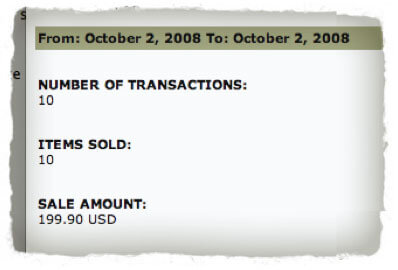
In one year, this business generated over $200,000, which was more than double what I was earning as an architect. Over time, I documented all of the earnings from this business (and more businesses I started) in my income reports.
Once you learn how to start an online business, the entire world of opportunities that exist open up to you. If you’re interested in learning how to start a business right now, I recommend reading my book, Will It Fly, How to Test Your Next Business Ideas So You Don’t Waste Your Time and Money (1000+ 5 Star Reviews) [Amazon affiliate link], and if you’d like to go even deeper, check out our SPI Community to get access to my online courses that walk you through this entire process with a community of other go-getters.
2. Affiliate marketing
Affiliate marketing is great because you can generate passive income simply by recommending products that already exist to other people. If you’ve ever recommended something to a friend, then you know how to do affiliate marketing already.
In fact, affiliate marketing has been my largest single source of revenue, bringing in over $4 million since 2009.
So, how does affiliate marketing work, exactly?
With affiliate marketing, you recommend other people or company’s products and services to your following. You can talk about it on YouTube, a website, in an email, or even just with your social following. And, when someone purchases from your recommendation, you’ll receive a commission from the sale.
It’s an awesome option because it’s easy to get started with, it’s low-risk, and there’s huge profit potential.
One of the most popular and accessible ways to get started is through the Amazon Affiliate Program. People already know and trust shopping from Amazon, and you’ll have a massive range of products to select from.
Just be sure only to choose products that you can stand behind and that will serve your audience well, and be sure to always be upfront that a link you promote is an affiliate link.
Ultimately, to be successful with this, you’ll need to put time into building an audience who trusts that you’ll always steer them in the right direction and then follow through on that.
To optimize your passive income efforts with affiliate marketing, make sure to take advantage of the best tools at your disposal. To help you out, I go over all the awesome affiliate marketing tools you need to know here.

Get superfans secrets in just 5 minutes, for free
Our weekly newsletter helps online entrepreneurs break through mental blocks, blind spots, and skill gaps. It’s the best 5-minute read you’ll find in your inbox.
Free newsletter. Unsubscribe anytime.

Join 100k+
Subscribers

3. Starting a YouTube channel
Starting a YouTube channel is a great option for making passive income online; it’s free to get started and if you create videos that people want to watch, you can generate revenue from ads, sponsorships, and even promoting your own products.
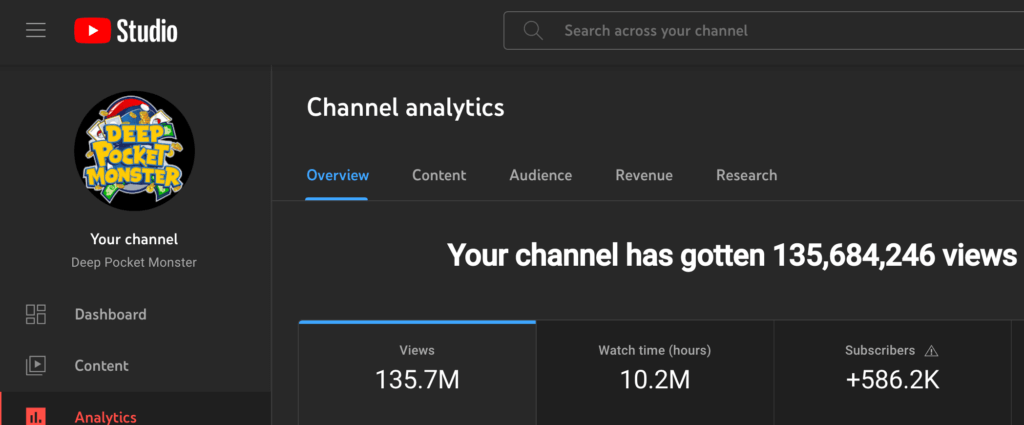
Recently, I started a new YouTube channel all about Pokémon cards called Deep Pocket Monster. In 2 years, this new channel has grown to over 500,000 subscribers and it generates revenue from ads, sponsorships, and even affiliate marketing by promoting card shops and binders on my videos.
4. Paid membership business
Like signing up for a gym membership, people join online memberships and pay recurring fees for the sense of community and/or value it brings them. In fact, we have one ourselves:
- Our SPI Community is a place for early-stage entrepreneurs to go from a business idea to full-time income with guidance from our team, access to all of our courses, workshops, community events, and even guides to help them through the material. There are three membership tier options to choose from.
The SPI Community require a recurring payment (quarterly or annual), however people are happy to continue to pay that because they’re getting more value in return.
If you haven’t noticed yet, serving an audience first and figuring out what’s best for them, whether it’s a product or service you create, or not, is the secret to success with passive income generation online.
With a membership business, you may need a platform to host your community. Circle is our top choice because it’s easy to use, and familiar to users who join. This is our affiliate link for Circle in case you’d like to check it out and give it a run!
5. Print-on-demand designs
If you have a keen eye for design and current trends and know how to use design software, selling print-on-demand designs could be a great option to create passive income.
With print-on-demand, you don’t have to buy any inventory ahead of time, so it’s a low-risk business model.
You’ll work with a print provider, like Printful or Teespring, to sell merch (t-shirts, mugs, bags, etc.) customized with your designs and sold on a per-order basis.
When someone buys one of your designs, the print provider fulfills, prints, and ships the order on your behalf.
This passive income method is quick and easy to get set up, and it requires very little maintenance once you’ve created your designs.
The trickiest part here comes down to making unique, high-quality designs that inspire your people to purchase them.
6. Software as a Service (SaaS) business
Another potentially lucrative option for passive income is to create an app or software that you can offer as a subscription service—also called software as a service (SaaS).
Like most things here, this isn’t just something I’m sharing because I heard about it, it’s something that I’ve done myself, too.
One of my companies, Fusebox.fm, is a podcast host that helps podcasts get started online at a very fair price. This provides recurring income each month from the thousands of users who use this product, and we continue to upgrade and add more features over time for our customers.
To do something like this, it does require coding knowledge or the funds to hire someone who knows how to code, but there are many resources available to find people who can do that kind of work for you, like Upwork.
Keep in mind that this is one of the more time-consuming options; it will take a good chunk of time to plan and get things up and running.
Also, you’re going to have to create and offer a truly valuable solution—and market your solution effectively—to make passive income with this, which isn’t exactly easy.
So, there’s no sugarcoating it; this is a difficult route. But it could be incredibly rewarding for you.
7. Creating an online course
Everyone has a skill they can teach, so why not monetize yours AND help others in the process by creating an online course?
Making an online course isn’t too difficult either, but it will take quite a bit of time and effort to ensure it’s useful. We host our online courses on both Teachable [affiliate link] and Circle [affiliate link], and it’s an amazing way to package information you have into a place that people can experience a transformation, or solve a problem.
And once you’ve created the content and have everything set up, it can be an incredibly profitable source of passive income.
There are several platforms, like Udemy or Skillshare, that you can choose from to host your course and facilitate getting your course paid viewers.
However, I always recommend using your website to give you greater control and true ownership of your course.
8. No-code apps
Did you know you can reap the benefits of creating an app without knowing how to code? Apart from hiring an expensive developer, that is.
Yep, you can take control over the process and create your own app through development platforms like Zapier, Appy Pie, or Bubble.
There are a lot of apps out there, so to be successful with this, you’ll need to search and identify a need and fill that need with your app.
If you set your objectives ahead of time and know exactly which problem you’re trying to solve—and who you’re solving it for—you’ll already be a step ahead of the competition.
With this, you can earn high passive income through downloads, subscriptions, ads, etc.—depending on how you model it.
9. Publishing an ebook
Selling eBooks online is a very accessible method to making passive income.
The idea of creating a whole digital “book” might still sound intimidating to you, but I promise it’s actually simple to do.
Your book’s content can be informative or simply entertaining, and it can be as short and simple as a five page PDF.
Plus, you don’t have to be a pro writer or even an expert on your eBook’s topic. Just be sure to provide high-quality, well-designed content that will resonate with your audience.
You can even hire a freelance ghostwriter and graphic designer to help you out.
Then, all you have to do is self-publish it to Amazon or Apple Books and promote it to your audience.
Writing an eBook gives you a vehicle to benefit your existing audience with helpful information, further strengthening your relationship with them.
It’s also a great tool to augment your audience to new levels and boost traffic to your website, podcast, and other channels—growing your brand as a whole.
10. Writing a book

Writing a physical book is a great way to generate passive income, not just from the potential sales of the book, but how it may even promote other services and products you have to offer.
I’ve written and published multiple books myself, and although it’s a tough route, it’s super rewarding, and the residual income, if you continue to market the book (or it takes off on its own) can be plentiful.
My self-published book, Will It Fly, even became a Wall Street Journal Bestseller! I published an income report about this book, which includes how many sales it generated, and exactly how much money it made over time, so you can see exactly how it can be done.
Spoiler alert, after 3-years, this book alone has generated a total of $459,341.00 (between 2016 and 2019).
I appreciate you!
There are way more opportunities that go way beyond this list of ideas above to generate passive income. With that being said, in the way that I teach success here at SPI, it’s about creating online resources in a way that serves a community of people.
That’s what it’s about, because as I ALWAYS say, “your earnings are a byproduct of how well you serve your audience.”
If you’d like to join a community of people just like you who are building their businesses right now, please check out our SPI Community because there’s a pathway to success for you. We’ll guide you across our entire course library to make sure you give yourself the best chance to earning an additional income. You got this!