Cleaning your email list? Here's how to set up a reengagement email sequence in ConvertKit to make sure you're only deleting cold subscribers!
The post How to Create a Reengagement Campaign for Cold Email Subscribers & Automate It appeared first on Smart Passive Income.
]]>
ConvertKit is now Kit!
Our recommended email service provider has changed their name to Kit. We're working to update our content to reflect this change. In the mean time, you may see us reference the product by either name—please know that our recommendation has not changed. You can read more about the name change here.
This is the second in our series of blog posts where we’ll take you along with us as we detail the process of cleaning our email list. In our case, this meant deleting a full 40% of subscribers from our list.
In the previous blog post (and accompanying video), we explained the why behind pruning your email list. The short version is that it makes financial sense, by reducing the cost of maintaining a large list, and it can help boost your email sending authority.
In the long run, trimming your email list is going to be beneficial as well. By deleting subscribers who have not engaged with your content in the last six months or more, you end up with a more engaged audience.
You do that with a reengagement email sequence, and in this post I'll walk you through how to create one in ConvertKit.
Trust but verify: How to make sure people are “cold” subscribers
Before you go ahead and delete a bunch of subscribers, you need to make sure these people are truly not engaging with your content. Why? Because your email service provider isn’t foolproof, and it may not be able to tell with absolute certainty.
For instance, somebody could be opening and reading every email you send, but that information might not be making its way back into your email service provider (ESP). And some subscribers who aren’t reading your emails could just use a reminder—a gentle kick in the pants—of what they’re missing out on.
So today we’re going to cover how to set up a reengagement email sequence that gives cold subscribers an opportunity to reengage with your content.
In this post, we’ll go through all of the automations we have set up to do this in our ESP of choice, ConvertKit.
Creating a reengagement sequence can feel complicated, even overwhelming. I highly recommend reading the high-level overview in this post, then watching Mindy’s video on the topic, which provides just the right level of detail on the process.
She shares a closer look at the email copy and automations we use for this sequence.
Here are the high-level steps of the process.
- Identify everyone who may be a cold subscriber.
- Set up an automation that will send a series of emails to these subscribers asking if they still want to be subscribed.
- Write the emails in your reengagement sequence.
- Create a second automation that keeps people on your list if they say they want to stay.
We'll cover the process of actually deleting your cold subscribers in the third post in this series. For now, let’s go over the four steps above in a little more detail!
Step 1: Identify your cold subscribers
You first need to assemble the list of likely cold subscribers that you want to run through the automation.
Here are the steps to do that in ConvertKit.
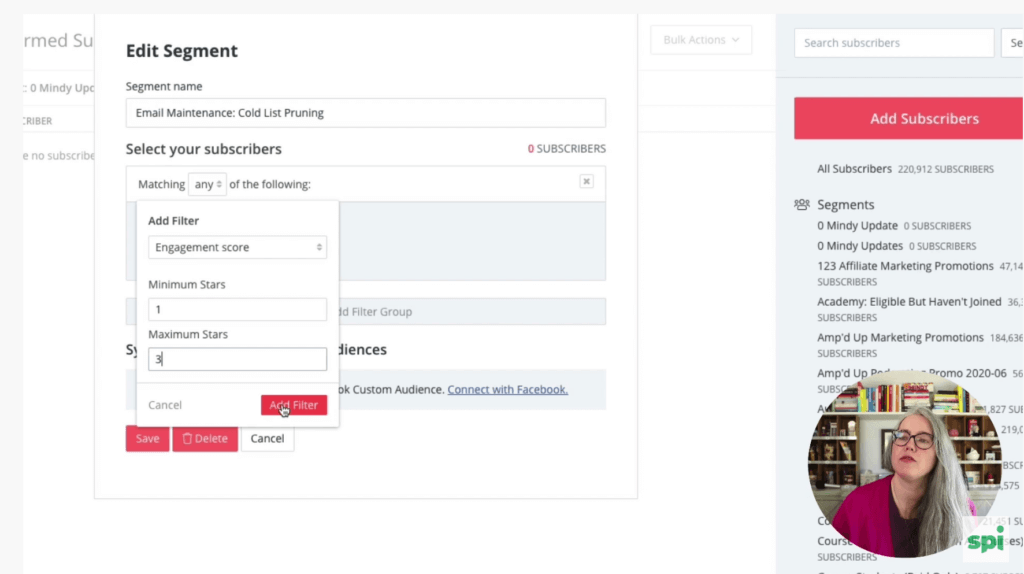
- Go to the Subscribers tab and create a new segment.
- Under “Select your subscribers,” set “Matching any/all/none of the following” to “any” and click “Add a filter.”
- Select “Engagement score,” set the minimums stars to 1 and maximum stars to 3, and click “Add Filter.”
Selecting subscribers between 1 and 3 stars lets us capture people who are less engaged in our email content.
Once you click Add Filter, you’ll see the number of subscribers who fit those criteria.
Hit Save on your new segment—we’ll come back to it in a little bit!
Step 2: Set up an automation to run your reengagement email sequence
This is where we set up our automation.
Click on Automate at the top of the ConvertKit window and create a new automation that will be kicked off when a tag is added. We created a tag called “Email Maintenance: Cold List Pruning” that, when we add it to a subscriber, will enter them in our automation.
It’s a pretty simple automation, with just a couple of steps:
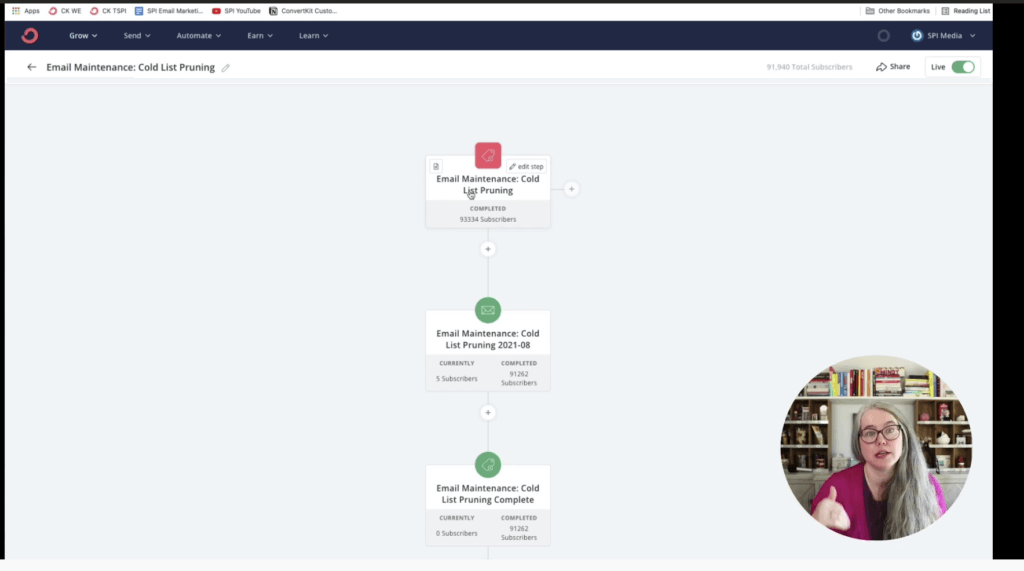
The first step is an email sequence. Everyone who completes that sequence will get a tag added to their profile called “Email Maintenance: Cold List Pruning Complete.”
These are the subscribers who make it all the way through the sequence without opting out—which means they're truly cold.
Let's dig into the emails in that sequence!
Step 3: Write the emails in your reengagement sequence
Our sequence is four emails sent over the course of two weeks.
There are different ways to approach building it. One strategy looks something like this:
- Email 1: “Hey! We’re going to unsubscribe you in 2 weeks.”
- Email 2: “Hey! We’re going to unsubscribe you in 10 weeks.”
- Email 3: “Hey! We’re going to unsubscribe you in 1 week.”
- Email 4: “Hey! We’re going to unsubscribe you in 1 day.”
You could do it that way—but we chose not to.
Instead, we crafted our reengagement sequence to share a ton of value and show people what they’ll be missing out on if they leave our list.
If they’re still not interested in staying after seeing the best of what we have to offer, then we know they’re not a good fit for us.
That’s why we decided to make the first three emails in our sequence as compelling as possible.
And if the reader doesn’t take action and decide to stay after reading those three emails, then it’s best that we part ways.
Check out Mindy’s video to get a sneak peek at the emails. And if you want the full copy of all the emails in the sequence, go to smartpassiveincome.com/cold, where you can download them. You’ll also get access to the automation we used to drop into your own ConvertKit account, and links to resources for more reading on pruning cold subscribers.
In a nutshell, here’s what those emails look like:
- Email 1 invites them to a free audience-building event.
- Email 2 provides a bunch of free downloads (our best lead magnets).
- Email 3 offers access to a free course.
- Email 4 tells them they’ll be deleted tomorrow if they don’t take action.
Each email provides a way for the subscriber to stay subscribed. For the first three emails, it’s by registering for the event, downloading one of the lead magnets, or signing up for the course.
Each email has a button that when clicked, keeps the subscriber on our list. Let’s go over how we set that up.
Step 4: Create a second automation that keeps people on your list
Next, we created a ConvertKit tag called “Email Maintenance: Stay on List.” If the reader clicks any of the links in the four emails, this tag will be added to their profile and they’ll be removed from the sequence. Cold no longer!
We do this with a second automation that removes the person from the sequence when the tag is added.
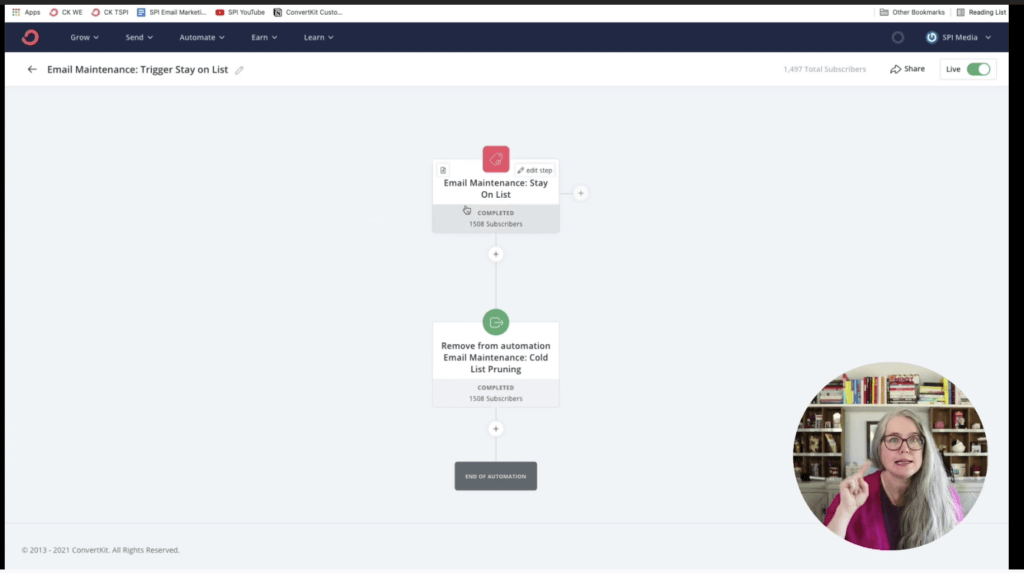
When you set up the link in each email, click “Tag subscribers who click this link” and select the “Email Maintenance: Stay on List” tag.
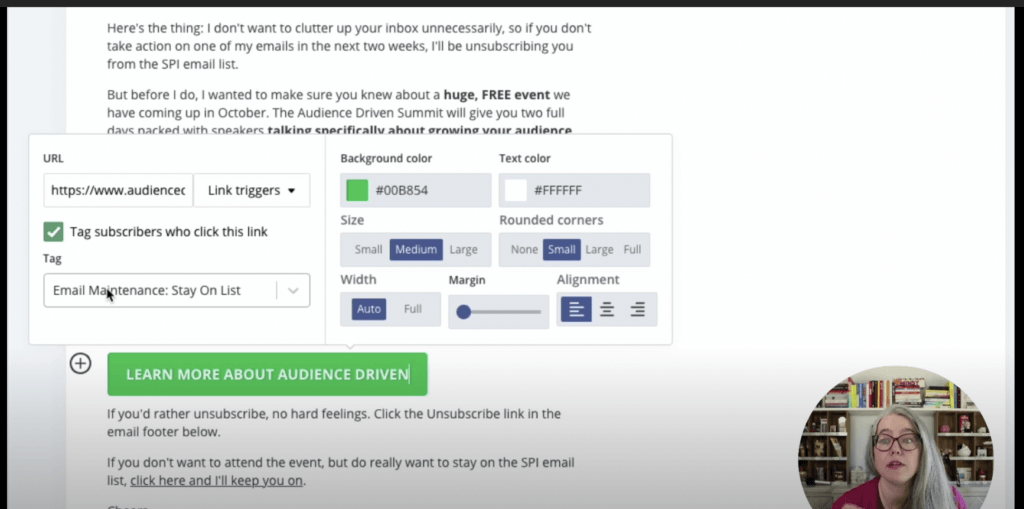
That’s the basic approach to building your reengagement email sequence! Mindy’s video will walk you through everything you need to set up and publish all four emails and push your sequence live.
Get the exact emails we use to reengage cold subscribers
We know that this process can feel scary and counterintuitive. You worked hard to get these people on your email list, and now you're just going to delete them?
That’s why we've put together an email series as a companion to these blog posts and videos that gives you more information about what goes into your reengagement email sequence. We give you the copy we use in the four emails to edit and use as you see fit, as well as links to ConvertKit automations you can add to your account.
Just go to smartpassiveincome.com/cold to grab all of that at no cost.
In the next and final blog post in this series, we’ll go over the results of the reengagement email sequence and how to delete the cold subscribers left after you’ve run everyone through the sequence.
The post How to Create a Reengagement Campaign for Cold Email Subscribers & Automate It appeared first on Smart Passive Income.
]]>